Ferrosa Database
Getting Started
Install Ferrosa and run a single-node instance in minutes. Everything you need to connect existing CQL drivers and start querying.
Developer Preview: Ferrosa is in active development. APIs, packaging, and configuration may change between releases. Evaluate with representative workloads before production use.
Installation
The installer detects your platform, downloads the latest release binary into ~/.ferrosa/bin/, writes a default config to ~/.ferrosa/config/, and optionally registers a launchctl/systemd unit and sets CQL admin credentials.
curl -fsSL https://www.ferrosa.ai/install.sh | bash
Supported platforms
| Platform | Tarball / Package |
|---|
| macOS Apple Silicon (arm64) | ferrosa-v<version>-aarch64-apple-darwin.tar.gz or Homebrew tap (brew install ferrosadb/tap/ferrosa) |
| macOS Intel (x86_64) | Not supported — macOS builds are Apple Silicon only. Build from source if needed. |
| Linux x86_64 (static musl) | ferrosa-v<version>-x86_64-unknown-linux-musl.tar.gz or .deb |
| Linux aarch64 (static musl) | ferrosa-v<version>-aarch64-unknown-linux-musl.tar.gz |
Release tarballs, .deb packages, and Homebrew bottles are published on the GitHub Releases page. Each release includes a SHA256SUMS file; verify with sha256sum -c SHA256SUMS --ignore-missing.
Build from source
If you prefer to build locally, you need a recent stable Rust toolchain:
git clone https://github.com/ferrosadb/ferrosa
cd ferrosa
cargo build --release
# Binaries land in ./target/release/ferrosa and ./target/release/ferrosa-ctl
Run Ferrosa
Minimal startup
# Start with defaults — all user-facing endpoints come up:
# CQL :9042 · Postgres :5432 · graph HTTP :7474 + Bolt :7687 · SPARQL :8080 · console :9090
ferrosa
Local by default. In the next developer-preview release, every listener in a fresh single-node install binds to 127.0.0.1: CQL, Postgres, Graph HTTP and Bolt, SPARQL, Flight, the web console, and internode RPC. Ferrosa does not expose a database on the network until an operator deliberately changes the relevant bind address and configures the deployment boundary.
Disable endpoints you don't need (reduce attack surface)
# Everything is on by default; opt out explicitly.
FERROSA_GRAPH_ENABLED=false FERROSA_SPARQL_ENABLED=false ferrosa
Custom ports and auth disabled (development)
FERROSA_CQL_BIND=127.0.0.1:9042 \
FERROSA_WEB_BIND=127.0.0.1:9090 \
FERROSA_AUTH_DISABLED=true \
ferrosa
Note: Ferrosa starts in standalone mode by default. Two-node pair mode
is available via FERROSA_SEED configuration. Full cluster formation (3+ nodes)
uses Raft consensus and a Murmur3 token ring; there is no separate
FERROSA_CLUSTER_MODE switch.
Operations console
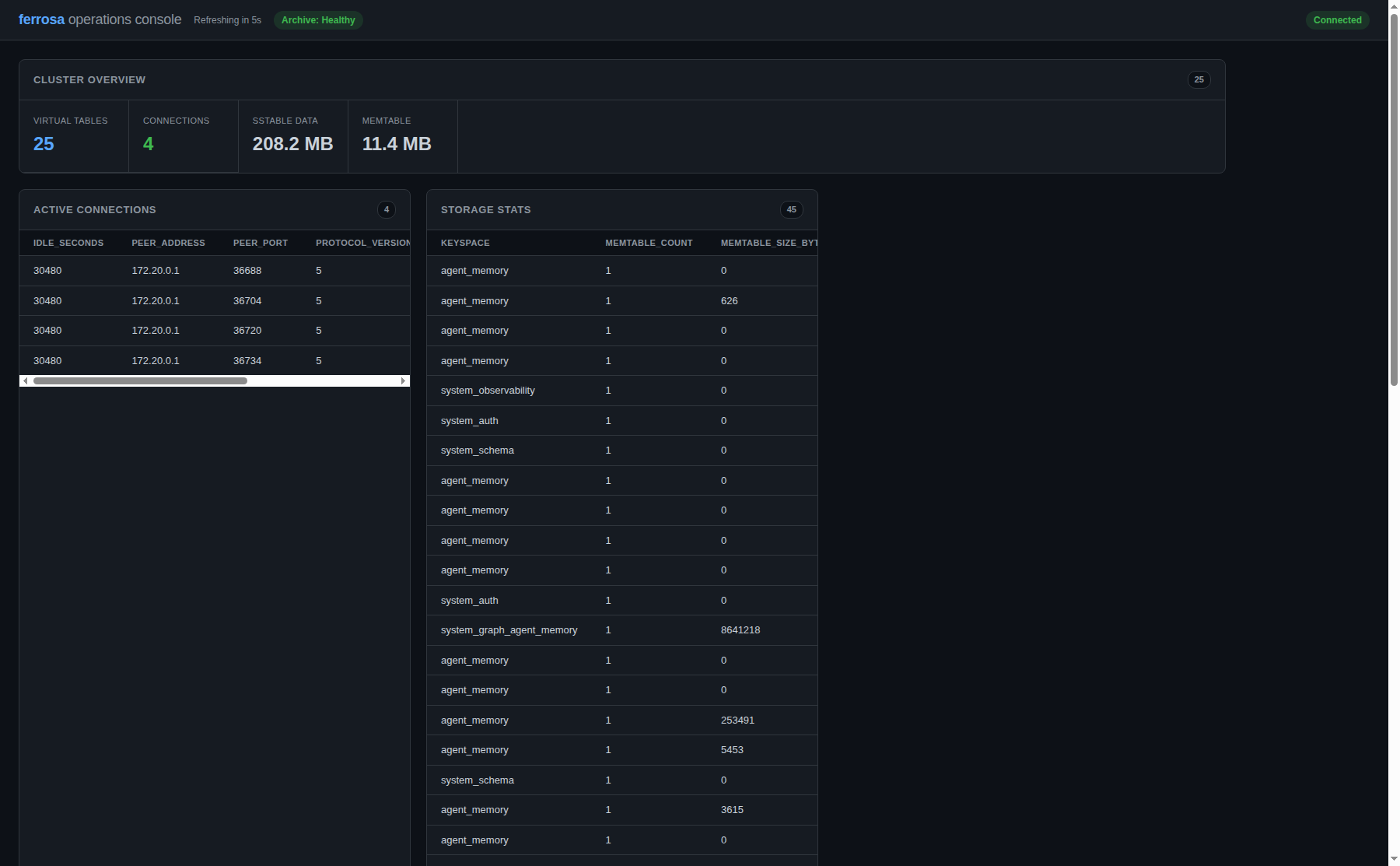
The local operations console is served by the running Ferrosa node. Use it during preview to inspect node status, metrics, and operational tables.
Open operations console screenshot
Default ports
| Service | Port | Protocol |
|---|
| CQL Server | 9042 | CQL native protocol (v4) |
| Postgres | 5432 | PostgreSQL v3 wire protocol (SCRAM-SHA-256) |
| Web Console | 9090 | HTTP (REST API + static UI + WebSocket) |
| Graph HTTP | 7474 | HTTP/JSON (Cypher queries) |
| Graph Bolt | 7687 | Bolt v5 (Neo4j drivers) |
| SPARQL | 8080 | SPARQL 1.1 protocol over HTTP |
| Prometheus Metrics | 9090/metrics | HTTP (text exposition) |
| Internode (cluster) | 17000 | Custom binary protocol (changed from :7000 in v0.11.0 to avoid macOS ControlCenter conflict) |
Connect a CQL Driver
Ferrosa speaks the CQL native protocol (negotiated at v4) — the same wire protocol as Apache Cassandra. Any standard CQL driver works unchanged.
Python
from cassandra.cluster import Cluster

cluster = Cluster(['127.0.0.1'])
session = cluster.connect()

# Create a keyspace
session.execute("""
    CREATE KEYSPACE demo WITH replication = {
        'class': 'SimpleStrategy',
        'replication_factor': 1
    }
""")

# Create a table
session.execute("""
    CREATE TABLE demo.users (
        user_id uuid PRIMARY KEY,
        name text,
        email text
    )
""")

# Insert and query
session.execute("""
    INSERT INTO demo.users (user_id, name, email)
    VALUES (uuid(), 'Alice', 'alice@example.com')
""")

rows = session.execute("SELECT * FROM demo.users")
for row in rows:
    print(row.name, row.email)
Java
// Same DataStax Java driver — just change the contact point
CqlSession session = CqlSession.builder()
    .addContactPoint(new InetSocketAddress("127.0.0.1", 9042))
    .withLocalDatacenter("datacenter1")
    .build();

ResultSet rs = session.execute("SELECT * FROM demo.users");
Go
cluster := gocql.NewCluster("127.0.0.1")
session, _ := cluster.CreateSession()
defer session.Close()

var name, email string
session.Query("SELECT name, email FROM demo.users LIMIT 1").Scan(&name, &email)
cqlsh
# Standard cqlsh connects directly
cqlsh 127.0.0.1 9042
Client bootstrap sequence
There is no extra Ferrosa-only client bootstrap ritual beyond normal Cassandra-compatible CQL behavior. A standard driver connects like this:
- Open a TCP connection to one configured contact point.
- Optionally send
OPTIONS and read SUPPORTED.
- Send
STARTUP, including compression preferences if the driver uses them.
- If auth is enabled, complete the standard SASL flow:
AUTHENTICATE → AUTH_RESPONSE → AUTH_SUCCESS. If auth is disabled, the server replies with READY.
- After
READY or AUTH_SUCCESS, the driver introspects system.local, system.peers, and system.peers_v2 to learn tokens, schema version, and peer CQL endpoints.
- The driver then opens or reroutes pooled connections to the advertised peer endpoints from those system tables.
In other words, topology discovery happens after the normal CQL handshake. If a client authenticates successfully and then stalls while dialing bad peer addresses, that is a topology advertisement problem, not a missing handshake step.
Important: An outside client does not send a special OPTIONS payload, startup flag, or Ferrosa-only command to request public addresses. External versus internal peer addresses are chosen automatically from the server side based on the source IP of the connection that is querying system.local / system.peers / system.peers_v2.
Transactions
Ferrosa supports strict serializable distributed transactions via the Accord protocol. Lightweight transactions (LWT) work with any CQL driver:
# Conditional insert — only succeeds if the row doesn't exist
session.execute("""
    INSERT INTO demo.users (user_id, name, email)
    VALUES (uuid(), 'Bob', 'bob@example.com')
    IF NOT EXISTS
""")

# Compare-and-set update
session.execute("""
    UPDATE demo.users SET email = 'newemail@example.com'
    WHERE user_id = ?
    IF email = 'bob@example.com'
""", [user_id])

# Multi-partition transaction
session.execute("""
    BEGIN TRANSACTION
      UPDATE accounts SET balance = balance - 100
        WHERE id = 'acct-1' IF balance >= 100;
      UPDATE accounts SET balance = balance + 100
        WHERE id = 'acct-2';
    COMMIT TRANSACTION
""")
Configuration Reference
Ferrosa is configured via environment variables and an optional TOML file. For listener settings, a value in the TOML file wins over the corresponding environment variable, which wins over the built-in default. The tables below cover the customer-facing runtime variables currently honored by the server.
Startup, Auth, and CQL
| Variable | Default | Description |
|---|
FERROSA_CONFIG | /etc/ferrosa/ferrosa.toml | Optional TOML config file loaded at startup |
FERROSA_MODE | development | Deployment mode used for production-safety checks |
FERROSA_HOST_ID | auto-generated | Stable node UUID persisted under the data directory |
FERROSA_CQL_BIND | 127.0.0.1:9042 | CQL server bind address |
FERROSA_CQL_BROADCAST | bind address/port | Public CQL address advertised to clients via system.local / system.peers_v2 |
FERROSA_CQL_INTERNAL_CLIENT_CIDRS | — | Comma-separated CIDRs whose clients should receive the internal topology view instead of the public CQL broadcast |
FERROSA_CQL_MAX_CONNECTIONS | 1024 | Maximum concurrent CQL connections |
FERROSA_CQL_MAX_CONNECTIONS_PER_IP | 64 | Per-client-IP connection cap |
FERROSA_CQL_TLS_CERT | — | PEM certificate path for CQL TLS |
FERROSA_CQL_TLS_KEY | — | PEM private-key path for CQL TLS |
FERROSA_CQL_REQUIRE_TLS | false | Fail startup if the CQL listener does not have TLS configured |
FERROSA_WEB_BIND | 127.0.0.1:9090 | Web console bind address |
FERROSA_AUTH_ENABLED | false | Enable CQL role auth and permission enforcement |
FERROSA_AUTH_WARN | false | Soak mode: log auth failures as warnings while still allowing requests |
FERROSA_AUTH_DISABLED | false | Development escape hatch that skips the CQL SASL handshake entirely |
FERROSA_SUPERUSER_PASSWORD | — | Optional override for the seeded ferrosa_admin password during bootstrap |
FERROSA_GRAPH_ENABLED | true | Graph engine (HTTP 7474 + Bolt 7687) — on by default; set false to disable |
FERROSA_GRAPH_BIND | 127.0.0.1:7474 | Graph HTTP bind address; Bolt uses the same host |
FERROSA_BOLT_PORT | 7687 | Bolt listener port |
FERROSA_SPARQL_ENABLED | true | SPARQL HTTP endpoint (8080) — on by default; set false to disable |
FERROSA_SPARQL_BIND | 127.0.0.1:8080 | SPARQL HTTP listen address |
FERROSA_POSTGRES_BIND | 127.0.0.1:5432 | Postgres wire-protocol bind address |
FERROSA_FLIGHT_BIND | 127.0.0.1:8815 | Arrow Flight bind address when built with the flight feature |
RUST_LOG | info | Tracing filter (e.g. debug, ferrosa_cql=trace) |
Production safety gate. With FERROSA_MODE=production, Ferrosa
refuses to start if it would expose an unauthenticated or unencrypted surface —
notably authentication disabled or CQL TLS not required. This prevents accidentally
running an open admin surface in production; development mode stays permissive.
Client paging cursors are HMAC-signed so a forged cursor can't read another partition.
Cluster, Internode, and Consensus
| Variable | Default | Description |
|---|
FERROSA_CLUSTER_NAME | ferrosa | Cluster name (must match across nodes) |
FERROSA_SEED | — | Comma-separated seed addresses; each entry may be an IP:port or resolvable hostname:port |
FERROSA_INTERNODE_BIND | 127.0.0.1:17000 | Internode protocol bind address |
FERROSA_INTERNODE_BROADCAST | 127.0.0.1:17000 | Address other nodes use to reach this node; also forms the default internal topology view. May be an IP:port or resolvable hostname:port. |
FERROSA_INTERNODE_PSK | — | Pre-shared key for internode auth (HMAC-SHA256) |
FERROSA_INTERNODE_TLS_CERT | — | PEM certificate path for internode TLS |
FERROSA_INTERNODE_TLS_KEY | — | PEM private-key path for internode TLS |
FERROSA_INTERNODE_TLS_CA | — | CA certificate for mutual-TLS internode verification |
FERROSA_INTERNODE_REQUIRE_TLS | false | Fail startup if internode TLS is required but not configured |
FERROSA_HEARTBEAT_INTERVAL_MS | 500 | Heartbeat interval between peers |
FERROSA_HEARTBEAT_TIMEOUT_MS | 1500 | Timeout before marking a peer as suspected down |
FERROSA_MAX_INTERNODE_CONNECTIONS | 512 | Maximum concurrent internode connections |
FERROSA_HANDSHAKE_TIMEOUT_SECS | 5 | Internode handshake timeout |
FERROSA_MAX_FRAME_BODY_SIZE | 268435456 | Maximum internode frame size in bytes |
FERROSA_MAX_STREAMS_PER_LANE | 128 | Maximum concurrent streams per internode connection lane |
FERROSA_DATA_CENTER | datacenter1 | Data center name |
FERROSA_RACK | rack1 | Rack name within the data center |
FERROSA_NUM_TOKENS | 256 | Number of tokens on the ring |
FERROSA_DEFAULT_CL | QUORUM | Default consistency level |
FERROSA_AUTO_JOIN | true | Automatically join the ring on startup (dev mode) |
FERROSA_HINTED_HANDOFF_DIR | data/hints | Local directory for hinted handoff files |
FERROSA_HINTED_HANDOFF_MAX_MB | 1024 | Max disk space for hinted handoff per peer (MB) |
FERROSA_FORMATION_TIMEOUT_SECS | 60 | Maximum time to wait in forming state before falling back |
FERROSA_NODE_ROLE | both | Node role: data, indexer, or both |
FERROSA_RAFT_HEARTBEAT_MS | 300 | Raft heartbeat interval |
FERROSA_RAFT_ELECTION_MIN_MS | 3000 | Lower bound for Raft election timeout |
FERROSA_RAFT_ELECTION_MAX_MS | 6000 | Upper bound for Raft election timeout |
FERROSA_CLOCK_MAX_SKEW_SECS | 5 | Maximum tolerated clock skew for Accord timestamp validation |
Storage and Durability
| Variable | Default | Description |
|---|
FERROSA_DATA_DIR | /var/lib/ferrosa | Local data directory for SSTables and commit log |
FERROSA_CACHE_MAX_BYTES | 10737418240 | Local LRU cache size (10 GB) |
FERROSA_FLUSH_THRESHOLD_BYTES | 67108864 | Memtable flush threshold (64 MB) |
FERROSA_FLUSH_MAX_AGE_SECS | 30 | Flush memtables after this age even if the size threshold is not reached |
FERROSA_FLUSH_INTERVAL_SECS | 30 | Background maintenance interval for flush and schema sync |
FERROSA_WRITE_VERIFY | true | Verify committed writes during the storage pipeline |
FERROSA_S3_ENDPOINT | — | S3-compatible endpoint URL |
FERROSA_S3_BUCKET | — | S3 bucket for durable storage |
FERROSA_S3_REGION | us-east-1 | AWS region for S3 |
FERROSA_S3_ACCESS_KEY_ID | — | Access key (falls back to instance profile) |
FERROSA_S3_SECRET_ACCESS_KEY | — | Secret access key |
FERROSA_S3_ALLOW_HTTP | false | Allow non-TLS for local dev (MinIO) |
FERROSA_S3_PREFIX | — | Key prefix for multi-tenant separation |
FERROSA_S3_UPLOAD_QUEUE_DEPTH | 16 | Upload backpressure queue depth |
FERROSA_ARCHIVE_ENABLED | false | Enable commit-log archiving |
FERROSA_ARCHIVE_POLL_INTERVAL_SECS | 5 | Archive poll interval in seconds |
FERROSA_ARCHIVE_RETENTION_DAYS | 7 | Retention period for archived commit-log segments |
Point-in-Time Restore
A node started with FERROSA_RESTORE_SNAPSHOT set opens by restoring that snapshot from object storage instead of opening its local state. Set the variables, then restart the node — the restore happens during startup, before the node accepts connections.
| Variable | Default | Description |
|---|
FERROSA_RESTORE_SNAPSHOT | — | Name of the snapshot to restore from at startup. When unset, the node starts normally. |
FERROSA_RESTORE_POINT_IN_TIME | snapshot boundary | RFC 3339 UTC timestamp (for example 2026-08-05T12:00:00Z). Archived commit-log segments are replayed up to and including this instant. Without it, the node restores to the snapshot boundary with no replay. |
FERROSA_RESTORE_FORCE | false | Accept a snapshot taken by a different node. Required when restoring onto a new node, since snapshots record the node that created them. |
Point-in-time replay requires FERROSA_ARCHIVE_ENABLED=true to have been set before the window you want to recover to. Restore can only replay segments that were archived at the time; it cannot recover a window that was never captured.
The timestamp is validated strictly at startup, before any data is downloaded. Non-UTC offsets, unpadded fields, and space-separated forms are rejected rather than guessed at — a misread cutoff would restore to the wrong moment. A point-in-time with no snapshot is also an error.
Applied at most once
Environment variables survive a reboot, so a restore is recorded once it succeeds. The node writes a marker to {data_dir}/.restore-applied, and a later start carrying the same values skips the restore rather than repeating it — otherwise every restart would roll the database back again and discard everything written since. Changing the snapshot or the point-in-time makes it a new request, which is applied normally.
To restore the same snapshot a second time deliberately, remove that marker file before starting the node.
Use the environment variables, not the HTTP endpoint. POST /api/restore currently validates a request and returns 202 Accepted, but it does not record the intent — restarting after calling it will not restore. Wiring that endpoint to the startup path is tracked for a future release.
Secondary Index and Search Backends
| Variable | Default | Description |
|---|
FERROSA_INDEX_BACKEND | local | Secondary-index backend: local, remote, or off |
FERROSA_INDEX_SIDECAR_ENDPOINTS | — | Comma-separated remote index sidecar URLs when FERROSA_INDEX_BACKEND=remote |
FERROSA_INDEX_SIDECAR_TIMEOUT_MS | 30000 | Per-request timeout for the remote index sidecar |
FERROSA_INDEX_SIDECAR_MAX_RETRIES | 2 | Retries per sidecar endpoint |
FERROSA_INDEX_CB_THRESHOLD | 5 | Circuit-breaker failure threshold for remote indexing |
FERROSA_INDEX_CB_RECOVERY_MS | 60000 | Circuit-breaker recovery interval in milliseconds |
Telemetry and Debug Endpoints
| Variable | Default | Description |
|---|
FERROSA_TELEMETRY_ENABLED | false | Enable sampled tracing telemetry in the observability stack |
FERROSA_TELEMETRY_SAMPLE_RATE | 0.01 | Fraction of spans to sample when telemetry is enabled |
FERROSA_DEBUG_AUTH_TOKEN | — | Bearer token protecting the debug endpoints |
FERROSA_DEBUG_IP_WHITELIST | — | Comma-separated IP allowlist for debug endpoints |
Compaction (STCS — default)
Size-Tiered Compaction is the default strategy when no per-table configuration is specified.
| Variable | Default | Description |
|---|
FERROSA_COMPACTION_MIN_THRESHOLD | 4 | Min SSTables to trigger compaction |
FERROSA_COMPACTION_MAX_THRESHOLD | 32 | Max SSTables per compaction task |
FERROSA_COMPACTION_BUCKET_LOW | 0.5 | Lower size ratio for bucket membership |
FERROSA_COMPACTION_BUCKET_HIGH | 1.5 | Upper size ratio for bucket membership |
Compaction (UCS — per-table)
Unified Compaction Strategy (Cassandra 5.0) uses density-based levels with a configurable fan factor.
Configure per-table via DDL:
CREATE TABLE ks.events (id uuid PRIMARY KEY, data text)
  WITH compaction = {
    'class': 'UnifiedCompactionStrategy',
    'fan_factor': '4'
  };
| Parameter | Default | Description |
|---|
fan_factor | 4 | SSTables per level before compaction triggers (W=2 aggressive, W=32 lazy) |
min_sstable_size | 104857600 | Minimum SSTable size (bytes) for density calculation |
CLI Tools
ferrosa-ctl
Admin CLI for querying and monitoring a running Ferrosa node.
# Run a CQL query
ferrosa-ctl query "SELECT * FROM demo.users"

# Describe schema
ferrosa-ctl describe

# Show Prometheus metrics
ferrosa-ctl metrics

# Node health status
ferrosa-ctl status

# Active CQL connections
ferrosa-ctl connections --sort client_addr

# Currently running queries (long-running only)
ferrosa-ctl queries --long-running

# Storage engine stats
ferrosa-ctl storage

# Live TUI dashboard (ratatui)
ferrosa-ctl monitor

# Cluster management
ferrosa-ctl add-node 10.0.0.5:17000        # Pre-approve a node for cluster join
ferrosa-ctl decommission 10.0.0.3:17000   # Gracefully remove a node
ferrosa-ctl ring                          # Show token ring distribution
ferrosa-ctl rebalance                     # Trigger token rebalancing
The monitor command launches a terminal dashboard with 5 panels showing connections, active queries, storage stats, and more. Navigate with arrow keys, refresh is automatic. Connect to a specific host with --host 10.0.0.1:9042.
Prometheus metrics: The /metrics endpoint is available on the web console port (default 9090) without authentication. Scrape it directly from Prometheus or any compatible monitoring system.
Architecture Overview
Ferrosa is composed of 12 independent Rust crates that can be used together or embedded individually.
ferrosa-common
Shared types: Token, PartitionKey, DecoratedKey, CellValue, Murmur3 partitioner.
ferrosa-sstable
Read/write BTI SSTables. On-disk trie, Bloom filter, LZ4/Zstd compression.
ferrosa-storage
Memtable, commit log with CDC, STCS + UCS compaction, S3 upload manager, NVMe pinning, local LRU cache.
ferrosa-schema
Schema registry with ArcSwap, RBAC auth, column-level permissions, audit logging.
ferrosa-index
Secondary index framework: B-tree, hash, composite, phonetic, vector (HNSW + IVFFlat). Async builds, staleness tracking.
ferrosa-cql
CQL v5 framing, LL(2) parser, prepared cache, LZ4/Snappy compression, and experimental SUBSCRIBE parser work.
ferrosa-udf
WebAssembly UDF executor: WIT contract, Wasmtime sandbox, per-function CPU/memory limits. In development.
ferrosa-graph
Cypher parser, logical/physical planner, expand executor, HTTP/JSON endpoint.
ferrosa-net
Internode protocol: 3 priority lanes, PSK handshake, RPC, heartbeat failure detection.
ferrosa-cluster
Pair mode HA, Raft consensus (openraft + sled), token ring, coordinator with tunable CL.
ferrosa-ctl
CLI admin tool: query, describe, metrics, monitor (ratatui TUI dashboard).
ferrosa (binary)
Composes all crates. CQL on :9042, graph on :7474, web console on :9090 (auth + WebSocket).
Operational Notes
Durable storage without S3 (single node)
A single-node install no longer requires S3 to be durable. Point Ferrosa at a
local directory and it uses a durable local file:// object-store backend —
flushed SSTables are persisted to that directory and treated as the source of truth
(eviction is disabled), so the corpus survives restarts on local disk alone:
FERROSA_LOCAL_STORE_PATH=~/.ferrosa/objectstore ferrosa
This is ideal for laptops, single-VM, and air-gapped deployments. S3 remains the
recommended durable backend for multi-node clusters and off-host recovery.
S3 Storage Resilience
When S3 is configured as the durable backend, Ferrosa writes asynchronously to S3 via an
upload queue. If S3 becomes temporarily unreachable:
- Reads and writes continue against local disk and memtables.
- Uploads are retried automatically when connectivity resumes.
- Data written during the outage exists only on local disk until the next successful upload.
Data loss window: If local disk is lost while S3 is unreachable, data written
since the last successful S3 upload may be lost. For production deployments, monitor the S3
upload queue depth and alert on sustained failures.
Schema Durability
Ferrosa persists all schema changes (keyspaces, tables, indexes, types, functions) to local disk on every flush and to S3 during periodic sync. When a node restarts — even after a binary upgrade with preserved data — the schema is restored automatically. No manual DDL replay is needed.
Compaction and S3
The storage pipeline handles compaction end-to-end:
- Memtable flushes to local SSTable
- Compaction strategy (STCS default, or UCS per-table) selects SSTables to merge
- Compacted output uploads to S3 with confirmation before manifest update
- Manifest uses compare-and-swap to prevent concurrent update loss
- Superseded input SSTables are deleted from S3 and local disk
Multi-Node Cluster (Experimental)
Three-node cluster formation uses Raft consensus for metadata and tunable consistency for
data. Current limitations:
- When one node in a three-node cluster goes down, reads and writes continue at reduced
availability depending on the configured consistency level.
- Schema state on surviving nodes may temporarily diverge until the failed node rejoins and
the Raft log is replayed.
- Automatic rebalancing after node loss is not yet implemented — use
ferrosa-ctl
for manual recovery.
Developer Preview: Multi-node cluster mode is still being validated. For HA evaluations, test two-node pair mode and failover behavior before relying on it.
Cluster FAQ
How do I run one cluster for both host clients and in-network clients?
Use two address families:
FERROSA_CQL_BROADCAST should point at the host- or externally-reachable CQL endpoint that off-node clients should dial after topology discovery.FERROSA_INTERNODE_BROADCAST should point at the address other Ferrosa nodes use to reach this node. Ferrosa also uses this address family as the internal topology view. Use either a stable IP:port or a hostname:port that resolves correctly from the other nodes.FERROSA_CQL_INTERNAL_CLIENT_CIDRS should list the container or pod CIDRs whose clients need the internal topology view.
Clients whose source IP falls inside FERROSA_CQL_INTERNAL_CLIENT_CIDRS receive internal addresses from system.local and system.peers_v2. Other clients receive the public CQL broadcast address.
There is no client-side override for this selection. If an outside client is being handed internal addresses, the fix is to correct Ferrosa's advertised public endpoint or the CIDR classification, not to change the driver's handshake messages.
Example: host Mac clients plus Podman-network clients
FERROSA_CQL_BIND=0.0.0.0:9042
FERROSA_CQL_BROADCAST=127.0.0.1:19042
FERROSA_INTERNODE_BROADCAST=10.89.1.48:17000
FERROSA_CQL_INTERNAL_CLIENT_CIDRS=10.89.0.0/16
In that setup, host-side drivers reconnect to 127.0.0.1:19042 after topology discovery, while clients running on the Podman network see 10.89.x.x:9042.
Can split-horizon DNS replace this configuration?
Not by itself. Cassandra-compatible topology tables expose inet columns, so drivers ultimately consume concrete IP addresses after topology discovery. Split DNS helps only if both environments can converge on the same reachable advertised IP, such as a shared VIP or proxy.
For the full architecture spec, see the
the project repository.
What's Next
CQL Reference
Ferrosa implements the CQL native protocol with negotiation capped at v4, including tested driver paths such as cdrs-tokio. This page documents what's supported, what's different, and what Ferrosa adds on top.
Beta: Ferrosa is currently in beta. CQL compatibility is under active development.
Protocol
Wire protocol
Ferrosa speaks the CQL native protocol with the standard 9-byte frame header and caps negotiation at protocol v4. v5 added a modern framing layer that drivers implement inconsistently — some send plain legacy envelopes at v5, others send CRC-checksummed modern frames — so no single server mode serves both. A v5 STARTUP is therefore rejected with a protocol-version error advertising v4 as the maximum, and every compliant driver (gocql, DataStax Java/C#, scylla-rust, cassandra-driver) transparently falls back to the one well-tested v4 transport, including cdrs-tokio. All 16 opcodes are handled:
| Opcode | Name | Direction |
|---|
| 0x00 | ERROR | Response |
| 0x01 | STARTUP | Request |
| 0x02 | READY | Response |
| 0x03 | AUTHENTICATE | Response |
| 0x05 | OPTIONS | Request |
| 0x06 | SUPPORTED | Response |
| 0x07 | QUERY | Request |
| 0x08 | RESULT | Response |
| 0x09 | PREPARE | Request |
| 0x0A | EXECUTE | Request |
| 0x0B | REGISTER | Request |
| 0x0C | EVENT | Response |
| 0x0D | BATCH | Request |
| 0x0E | AUTH_CHALLENGE | Response |
| 0x0F | AUTH_RESPONSE | Request |
| 0x10 | AUTH_SUCCESS | Response |
Compression
Frame-level compression is negotiated during STARTUP via the COMPRESSION option:
- LZ4 — recommended for production (fast, low overhead)
- Snappy — alternative with good compression ratio
Compression is optional. Uncompressed frames are always accepted.
Authentication
SASL PLAIN authentication via the standard org.apache.cassandra.auth.PasswordAuthenticator flow. Passwords are hashed with bcrypt or argon2. Disable with FERROSA_AUTH_DISABLED=true for development.
Driver bootstrap and topology discovery
Driver bootstrap follows the standard Cassandra-compatible sequence. There is no Ferrosa-specific handshake required to unlock topology metadata:
- Connect to an initial contact point.
- Optionally exchange
OPTIONS / SUPPORTED.
- Send
STARTUP.
- If auth is enabled, complete
AUTHENTICATE → AUTH_RESPONSE → AUTH_SUCCESS. Otherwise the server returns READY directly.
- Only after the connection reaches
READY or AUTH_SUCCESS does the driver query system.local, system.peers, and system.peers_v2.
- The driver uses those system-table rows to discover tokens, schema version, and the peer endpoints it should dial next.
This means post-auth hangs that occur while a driver is opening peer connections usually indicate bad topology metadata, not a missing bootstrap message. Ferrosa must advertise peer addresses that are reachable from the client's network.
Explicitly: OPTIONS does not control whether the client receives public or internal peer addresses. Neither do STARTUP, compression settings, or any Ferrosa-specific extension flag. The server chooses which addresses to return based on the source IP of the established client connection when servicing the topology queries.
Data Types
| CQL Type | Protocol ID | Status |
|---|
| ascii | 0x0001 | Supported |
| bigint | 0x0002 | Supported |
| blob | 0x0003 | Supported |
| boolean | 0x0004 | Supported |
| counter | 0x0005 | Supported |
| decimal | 0x0006 | Supported |
| double | 0x0007 | Supported |
| float | 0x0008 | Supported |
| int | 0x0009 | Supported |
| timestamp | 0x000B | Supported |
| uuid | 0x000C | Supported |
| varchar / text | 0x000D | Supported |
| varint | 0x000E | Supported |
| timeuuid | 0x000F | Supported |
| inet | 0x0010 | Supported |
| date | 0x0011 | Supported |
| time | 0x0012 | Supported |
| smallint | 0x0013 | Supported |
| tinyint | 0x0014 | Supported |
| list<T> | 0x0020 | Supported |
| map<K, V> | 0x0021 | Supported |
| set<T> | 0x0022 | Supported |
| tuple<...> | 0x0031 | Supported |
| frozen<T> | — | Supported |
| duration | 0x0015 | Supported |
| UDT | 0x0030 | Supported |
| vector<float, N> | 0x0033 | Supported |
Collection bind values in prepared statements are fully supported. Map, set, and list values bound via EXECUTE are stored in Cassandra-compatible wire format and survive flush, compaction, and S3 upload without format loss.
DDL Statements
| Statement | Status | Notes |
|---|
| CREATE KEYSPACE | Supported | WITH replication (SimpleStrategy / NetworkTopologyStrategy), IF NOT EXISTS, DURABLE_WRITES. Transient replication ('DC1': '3/1') is rejected — Ferrosa does not implement it, and accepting it would corrupt driver schema metadata. |
| ALTER KEYSPACE | Supported | Change replication, durable_writes |
| DROP KEYSPACE | Supported | IF EXISTS |
| CREATE TABLE | Supported | Partition key, clustering key with order, IF NOT EXISTS, table options (compaction, compression, comment, TTL, gc_grace) |
| ALTER TABLE | Supported | ADD column, DROP column |
| DROP TABLE | Supported | IF EXISTS |
| CREATE INDEX | Supported | USING type, WITH OPTIONS, IF NOT EXISTS — see below |
| DROP INDEX | Supported | IF EXISTS |
| DROP (without TABLE keyword) | Supported | DROP keyspace_name.table_name shorthand |
| CREATE MATERIALIZED VIEW | Not yet | — |
| CREATE TYPE (UDT) | Supported | CREATE TYPE, ALTER TYPE, DROP TYPE — full UDT DDL lifecycle |
| CREATE FUNCTION / AGGREGATE | Supported | CREATE/DROP FUNCTION, CREATE/DROP AGGREGATE — full DDL lifecycle with cluster replication. UDFs are WebAssembly components (LANGUAGE wasm AS '<hex>' | AS FILE '…' | AS URL '…' WITH SHA256 = '…'); Java UDFs are not supported. Keyspace-qualified calls (ks.fn(args)) work in SELECT. |
Prepared statements remain valid after ALTER TABLE ADD or DROP column — the schema snapshot updates atomically and subsequent PREPARE calls reflect the current column set.
Example
CREATE KEYSPACE social WITH replication = {
  'class': 'SimpleStrategy',
  'replication_factor': 3
} AND durable_writes = true;

CREATE TABLE social.users (
  user_id uuid,
  name text,
  email text,
  created_at timestamp,
  tags set<text>,
  PRIMARY KEY (user_id)
);

-- Per-table compaction strategy (default: STCS)
CREATE TABLE social.events (
  event_id uuid,
  payload text,
  PRIMARY KEY (event_id)
) WITH compaction = {
  'class': 'UnifiedCompactionStrategy',
  'fan_factor': '4'
};
Compaction Strategies
| Strategy | DDL Class Name | Behavior |
|---|
| STCS (default) | none required | Size-Tiered — groups SSTables by similar size |
| UCS | UnifiedCompactionStrategy | Density-based levels with fan factor: W=2 (LCS-like), W=4 (balanced), W=32 (STCS-like) |
DML Statements
| Statement | Status | Notes |
|---|
| SELECT | Supported | WHERE, ORDER BY, LIMIT, DISTINCT, bind markers (?), named bind markers (:name), IN clause, ALLOW FILTERING, token(), CONTAINS / CONTAINS KEY, LIKE, SOUNDS LIKE, fts_match() |
| INSERT | Supported | IF NOT EXISTS (LWT), USING TTL, USING TIMESTAMP |
| UPDATE | Supported | SET, WHERE, IF conditions (LWT), collection +/- operators, counter increment/decrement |
| DELETE | Supported | WHERE, IF EXISTS / IF conditions (LWT), column-level delete, map element delete syntax |
| BATCH | Supported | BEGIN BATCH ... APPLY BATCH (unlogged), batch CAS (conditional batch) |
| BEGIN TRANSACTION | Supported | BEGIN TRANSACTION ... COMMIT TRANSACTION / ROLLBACK TRANSACTION (Accord) |
| TRUNCATE | Supported | — |
| USE | Supported | Set default keyspace for session |
Built-in functions
| Function | Status | Notes |
|---|
| toJson() | Supported | Serialize any column to JSON string |
| token() | Supported | Token-range queries in WHERE clauses |
| uuid() | Supported | Generate random UUID |
| now() | Supported | Current timeuuid |
| toTimestamp() | Supported | Convert timeuuid to timestamp |
| currentDate() | Supported | Today's date (for temporal arithmetic in WHERE) |
Durations & temporal arithmetic
The duration type accepts both literal forms — compact
(2d, 1mo3d, 89h4m48s) and ISO-8601
(P1Y2M3D, PT4H5M6S). A WHERE predicate may add or
subtract a duration from a date or timestamp; months
and days are applied calendar-aware (e.g. Jan 31 + 1mo clamps to
the last day of February).
-- rows from the last two days
SELECT * FROM events
  WHERE day >= currentDate() - 2d ALLOW FILTERING;
Prepared statements
Full PREPARE/EXECUTE support with positional bind values. PREPARE responses include pk_count metadata for driver routing. The prepared statement cache uses moka with W-TinyLFU eviction (64 MB default). Bind markers (?) and named bind markers (:name) are both supported.
Bind values are fully supported in QUERY frames — positional (?) and named (:name) markers work in all statement types: SELECT, INSERT, UPDATE, DELETE. Collection-typed bind values (map, set, list) are passed through in Cassandra wire format for correct round-trip storage.
-- Prepare
PREPARE stmt FROM 'SELECT * FROM social.users WHERE user_id = ?';

-- Execute with positional bind
EXECUTE stmt USING 550e8400-e29b-41d4-a716-446655440000;
Comparison operators
WHERE clauses support: =, <, >, <=, >=, !=, IN, CONTAINS, CONTAINS KEY, LIKE
LIKE matches text patterns with the % wildcard (any sequence of characters) — 'pre%' (prefix), '%suf' (suffix), '%mid%' (contains), or an exact literal. Matching is case-sensitive. As a non-key predicate it is evaluated as a post-scan filter and requires ALLOW FILTERING.
-- names beginning with 'M'
SELECT * FROM cycling.cyclist_name
  WHERE firstname LIKE 'M%' ALLOW FILTERING;
Consistency levels
Ferrosa supports the following consistency levels for reads and writes:
ONETWOTHREEQUORUMALLLOCAL_ONELOCAL_QUORUMEACH_QUORUMSERIAL — for lightweight transaction reads (linearizable)LOCAL_SERIAL — for lightweight transaction reads (local DC linearizable)
Set per-query via the standard CQL protocol flags, or configure a default with FERROSA_DEFAULT_CL (default: QUORUM).
Conflict resolution
Cells reconcile by last-write-wins on timestamp: the higher write timestamp wins. When two writes to the same cell share the same timestamp, the lexicographically greater value wins, so the result is deterministic regardless of replica or compaction order.
Difference from Cassandra: when a write and a delete carry the same timestamp, Ferrosa favors the write — the data is preserved. Apache Cassandra resolves the same tie in favor of the delete (the tombstone wins). If you depend on Cassandra's delete-wins-on-tie behavior, use distinct timestamps for the delete.
Auth & Roles
| Statement | Status | Notes |
|---|
| CREATE ROLE | Supported | WITH PASSWORD, HASHED PASSWORD, SUPERUSER, LOGIN, OPTIONS, IF NOT EXISTS |
| ALTER ROLE | Supported | Change PASSWORD / HASHED PASSWORD, SUPERUSER, LOGIN |
| CREATE USER / ALTER USER | Supported | Legacy alias; WITH [HASHED] PASSWORD, SUPERUSER / NOSUPERUSER |
| DROP ROLE | Supported | IF EXISTS |
| GRANT | Supported | GRANT perm[, perm…] ON resource TO role. Resource: ON TABLE ks.t / ks.t, ON KEYSPACE, ON ALL KEYSPACES, ON ALL ROLES, ON FUNCTION. Unknown permissions are rejected (no silent partial grant). |
| REVOKE | Supported | REVOKE perm[, perm…] ON resource FROM role (same resource forms as GRANT) |
| GRANT / REVOKE role | Supported | GRANT <role> TO <member> / REVOKE <role> FROM <member> — role hierarchy (the member inherits the role's permissions). Replicated additively (one membership edge per op) and cycle-checked at apply, so concurrent grants never clobber and a revoke is never lost to a racing grant. |
| LIST ROLES | Supported | LIST ROLES [OF <role>] [NORECURSIVE]; LIST USERS alias |
| LIST PERMISSIONS | Supported | LIST [ALL | <permission>] PERMISSIONS [ON <resource>] [OF <role>] [NORECURSIVE] — gated on DESCRIBE over all roles |
| ACCESS TO/FROM (network auth) | Rejected | ACCESS TO DATACENTERS / FROM CIDRS is parsed but rejected — ferrosa has no network authorizer, so an unenforced access restriction fails loud rather than being silently accepted |
HASHED PASSWORD. CREATE ROLE … WITH HASHED PASSWORD = '<hash>' (and the legacy CREATE USER … WITH HASHED PASSWORD '<hash>') stores a pre-computed bcrypt or argon2id hash verbatim — it is not re-hashed, which lets you migrate existing credentials. The hash format is validated on the coordinator and rejected if unsupported, so a role can never hold a credential the authenticator cannot verify. Password and hash literals are redacted from any log line or error message.
-- Plaintext password — hashed server-side with bcrypt / argon2id
CREATE ROLE app_writer WITH PASSWORD = 'S3cret-Pass!' AND LOGIN = true;

-- Migrate an existing credential: a pre-computed hash, stored verbatim
CREATE ROLE legacy_user
  WITH HASHED PASSWORD = '$2a$10$JSJEMFm6GeaW9XxT5JIheuEtPvat6i7uKbnTcxX3c1wshIIsGyUtG'
  AND LOGIN = true;

-- Custom authenticator OPTIONS (accepted; not interpreted by the default authenticator)
CREATE ROLE svc WITH PASSWORD = 'p' AND OPTIONS = { 'ttl' : '3600' };

-- Rotate to a new hashed credential, or toggle superuser/login
ALTER ROLE app_writer WITH HASHED PASSWORD = '$argon2id$v=19$m=19456,t=2,p=1$c29tZXNhbHQ$aGFzaA';

-- Legacy USER alias: no '=', trailing SUPERUSER / NOSUPERUSER
CREATE USER ops WITH HASHED PASSWORD '$2a$10$JSJEMFm6GeaW9XxT5JIheuEtPvat6i7uKbnTcxX3c1wshIIsGyUtG' NOSUPERUSER;

-- Network authorization is parsed but REJECTED (no network authorizer):
--   CREATE ROLE r WITH PASSWORD = 'p' AND ACCESS TO DATACENTERS {'DC1'};  -- error
Ferrosa supports column-level permissions, rate limiting per role, and audit logging to configurable sinks (log file, audit table).
System Keyspaces
system_schema
Standard Cassandra system schema tables for driver compatibility:
system_schema.keyspacessystem_schema.tablessystem_schema.columnssystem_schema.typessystem_schema.functionssystem_schema.aggregatessystem_schema.triggerssystem_schema.viewssystem_schema.indexes
system.local
Node metadata including tokens column for driver topology awareness. Drivers typically read this immediately after READY or AUTH_SUCCESS as part of topology discovery.
system_observability (Ferrosa extension)
Virtual tables backed by live in-memory state, not persisted:
system_observability.connections — active CQL client connectionssystem_observability.active_queries — currently executing queriessystem_observability.storage_stats — storage engine metricssystem_views.secondary_indexes — per-index build status, staleness, pending work
-- Check active connections
SELECT * FROM system_observability.connections;

-- Monitor running queries
SELECT * FROM system_observability.active_queries;

-- Storage engine stats
SELECT * FROM system_observability.storage_stats;
Secondary Indexes
Beyond Cassandra: Ferrosa's secondary index framework goes far beyond Cassandra's SAI
or legacy 2i indexes. Eight pluggable index types cover traditional queries, full-text phonetic
search, and AI/ML vector similarity — all built into the database without requiring a separate search service for the preview path.
Index types
| Type | USING clause | Use case |
|---|
| B-tree | 'btree' (default) | Ordered range queries and sorted scans |
| Hash | 'hash' | O(1) equality point lookups |
| Composite | 'composite' | Multi-column prefix-based lookups |
| Phonetic | 'phonetic' | Fuzzy name matching (Soundex, Metaphone, Double Metaphone, Caverphone) |
| Filtered | Any + WHERE | Partial index over a subset of rows |
| Vector (HNSW) | 'vector' | Approximate nearest neighbor — graph-based, best query performance |
| Vector (IVFFlat) | 'vector' | Approximate nearest neighbor — k-means clustering, faster builds |
| Vector (HVQ) | 'vector' WITH OPTIONS = {'method':'hvq'} | Quantized approximate nearest neighbor — reads far fewer bytes per query (evaluation) |
Creating indexes
-- B-tree index (default when USING is omitted)
CREATE INDEX idx_email ON users (email) USING 'btree';

-- Hash index for fast equality lookups
CREATE INDEX idx_user_id ON sessions (user_id) USING 'hash';

-- Composite index across multiple columns
CREATE INDEX idx_name ON users (last_name, first_name) USING 'composite';

-- Phonetic index for "sounds like" matching
CREATE INDEX idx_name_phonetic ON users (last_name)
  USING 'phonetic' WITH OPTIONS = {'algorithm': 'double_metaphone'};

-- Filtered index — only index active users
CREATE INDEX idx_active_email ON users (email)
  USING 'btree' WHERE status = 'active';

-- IF NOT EXISTS is supported
CREATE INDEX IF NOT EXISTS idx_email ON users (email);

-- Drop an index
DROP INDEX idx_email;
DROP INDEX IF EXISTS idx_email;
Vector indexes for AI and similarity search
Ferrosa includes two vector index algorithms for approximate nearest neighbor (ANN) search, supporting AI embeddings, semantic search, and recommendation systems:
-- HNSW index — best query performance, incremental builds
CREATE INDEX idx_embed ON documents (embedding)
  USING 'vector' WITH OPTIONS = {
    'method': 'hnsw',
    'metric': 'cosine',
    'dimensions': '768',
    'm': '16',
    'ef_construction': '200'
  };

-- IVFFlat index — faster builds, good for batch imports
CREATE INDEX idx_embed_ivf ON documents (embedding)
  USING 'vector' WITH OPTIONS = {
    'method': 'ivfflat',
    'metric': 'l2',
    'dimensions': '1536',
    'lists': '100'
  };
Distance metrics
| Metric | Value | Use case |
|---|
| L2 (Euclidean) | 'l2' | Standard distance — smaller = more similar |
| Cosine | 'cosine' | Angle-based similarity — ideal for text embeddings |
| Inner product | 'inner_product' | Dot product — larger = more similar |
Supports up to 4,096 dimensions (f32) or 8,192 dimensions (f16 half-precision).
Full-text search indexes
Ferrosa includes built-in full-text search with inverted index sidecars and BM25 ranked retrieval. No external search engine required.
-- Create a full-text index on a text column
CREATE INDEX idx_body ON articles (body)
  USING 'fulltext';

-- Query with fts_match() — boolean operators, phrase, prefix
SELECT * FROM articles
  WHERE body = fts_match('distributed AND database');

SELECT * FROM articles
  WHERE body = fts_match('"S3 backed storage"');

SELECT * FROM articles
  WHERE body = fts_match('compac*');

SELECT * FROM articles
  WHERE body = fts_match('NOT deprecated');
| Query syntax | Example | Description |
|---|
| Single term | 'rust' | Match documents containing the analyzed term |
| AND | 'rust AND database' | Both terms must be present |
| OR | 'rust OR go' | Either term must be present |
| NOT | 'NOT deprecated' | Exclude documents matching the term |
| Phrase | '"exact phrase"' | All words must appear (proximity approximation) |
| Prefix | 'compac*' | Wildcard prefix expansion (capped at 10K terms) |
Results are ranked by BM25 relevance score. The default analyzer lowercases, removes English stop words, and applies Porter stemming. Custom stop words can be configured via index options.
NVMe table pinning
Pin hot tables to local NVMe storage for latency-sensitive reads, avoiding object-store fetches on the hot path:
-- Create a pinned table
CREATE TABLE session_cache (
  session_id uuid PRIMARY KEY,
  user_id uuid,
  data blob
) WITH extensions = {'storage.pin': 'nvme'};

-- Pin with size cap (evict oldest beyond 10 GB)
CREATE TABLE hot_lookups (
  key text PRIMARY KEY,
  value blob
) WITH extensions = {'storage.pin': 'nvme',
  'storage.pin_max_bytes': '10737418240'};

-- Toggle pin on a live table
ALTER TABLE session_cache
  WITH extensions = {'storage.pin': 'none'};
Pinned tables trade durability for latency — data is lost on node replacement unless replicated. Commit log still provides crash recovery within a single node.
Phonetic algorithms
| Algorithm | Value | Best for |
|---|
| Soundex | 'soundex' | Standard American English names |
| Metaphone | 'metaphone' | General English pronunciation |
| Double Metaphone | 'double_metaphone' | Multi-origin names (returns primary + alternate codes) |
| Caverphone | 'caverphone' | New Zealand English names |
How indexes work
Ferrosa indexes are storage-attached — built as companion files alongside SSTables. Indexes are built asynchronously after memtable flush, off the foreground write acknowledgement path. This means:
- Foreground write acknowledgements are not blocked by index maintenance
- Indexes are eventually consistent — there's a brief window between write and index availability
- Per-index staleness tracking via
system_views.secondary_indexes lets you monitor how far behind each index is
- Best-effort queries — queries union indexed SSTable results with scans of not-yet-indexed SSTables, so results are always complete
Monitoring index status
-- Check index build status and staleness
SELECT index_name, status, pending_sstable_count, lag_seconds
FROM system_views.secondary_indexes;

-- View index metadata
SELECT index_name, kind, target, options
FROM system_schema.indexes
WHERE keyspace_name = 'myapp';
Multi-node replication
All index DDL (CREATE INDEX, DROP INDEX) replicates automatically in pair mode. Each node independently builds indexes for its local SSTables — no cross-node index coordination needed.
Transactions (Accord)
Strict Serializable: Ferrosa implements distributed transactions via the
Accord consensus protocol — providing strict serializability without Paxos. All Cassandra
lightweight transaction (LWT) patterns are supported, plus multi-statement transactions.
Lightweight transactions (LWT)
Supported conditional-mutation patterns for lightweight transactions:
| Pattern | Status | Notes |
|---|
| INSERT ... IF NOT EXISTS | Supported | Returns [applied] boolean column |
| UPDATE ... IF condition | Supported | Compare-and-set on any column; supports =, !=, <, >, <=, >=, IN |
| DELETE ... IF EXISTS | Supported | Conditional delete |
| DELETE ... IF condition | Supported | Conditional delete with column checks |
| Batch CAS | Supported | BEGIN BATCH with IF conditions across statements |
-- Insert only if the row doesn't exist
INSERT INTO accounts (id, balance, owner)
VALUES ('acct-1', 1000, 'Alice')
IF NOT EXISTS;

-- Conditional update (compare-and-set)
UPDATE accounts SET balance = 900
WHERE id = 'acct-1'
IF balance = 1000;

-- Conditional delete
DELETE FROM accounts
WHERE id = 'acct-1'
IF balance = 0;
Multi-statement transactions
Ferrosa extends CQL with explicit transaction blocks for multi-partition atomic operations:
-- Atomic transfer across partitions
BEGIN TRANSACTION
  UPDATE accounts SET balance = balance - 100
    WHERE id = 'acct-1' IF balance >= 100;
  UPDATE accounts SET balance = balance + 100
    WHERE id = 'acct-2';
COMMIT TRANSACTION;

-- Rollback on failure
ROLLBACK TRANSACTION;
Consistency levels for transactions
LWT operations use SERIAL or LOCAL_SERIAL consistency for the read phase, combined with any standard write consistency level. This matches Cassandra's LWT behavior exactly.
How it works
Ferrosa uses the Accord consensus protocol (not Paxos) for transaction coordination:
- Fast path (1-RTT): When a leaseholder can coordinate, transactions commit in a single round trip
- Slow path (2-RTT): When coordination is needed across shards, a second round trip resolves conflicts
- Linearizable reads: Dependency-checked reads through a conflict index ensure read-after-write consistency
- Crash recovery: Protocol log replay and .accord sidecar files ensure no committed transactions are lost
SUBSCRIBE Extension
Developer-preview note: SUBSCRIBE is a Ferrosa-specific CQL extension under active verification.
Table-level polling/subscription examples are design targets; arbitrary SELECT streaming and driver behavior are not yet public compatibility guarantees.
Syntax
-- Subscribe to a table with polling interval
SUBSCRIBE keyspace.table EVERY 5s;

-- Subscribe with push-on-write (change data capture)
SUBSCRIBE keyspace.table DELTA;

-- Arbitrary SELECT and observability subscriptions remain verification work

-- Unsubscribe from a specific stream
UNSUBSCRIBE 42;

-- Unsubscribe from all streams
UNSUBSCRIBE;
Modes
| Mode | Syntax | Behavior |
|---|
| EVERY | EVERY 5s | Server re-executes the query at the given interval and pushes results |
| DELTA | DELTA | Push-on-write via SubscriptionObserver in the commit log; only changed rows are sent |
Backward compatibility
SUBSCRIBE response framing is still being verified against real drivers. Treat this extension as experimental until compatibility evidence is attached.
Graph (Cypher) Extension
Ferrosa Extension: Cypher graph queries run against CQL tables annotated with
graph schema extensions. Queries are sent to a separate HTTP/JSON endpoint on port 7474.
Schema extensions
-- Mark a table as a vertex type
ALTER TABLE social.users
  WITH extensions = {'graph.type': 'vertex', 'graph.label': 'Person'};

-- Mark a table as an edge type
ALTER TABLE social.follows
  WITH extensions = {
    'graph.type': 'edge',
    'graph.label': 'FOLLOWS',
    'graph.source': 'Person',
    'graph.target': 'Person'
  };
Supported Cypher statements
| Statement | Status | Notes |
|---|
| MATCH ... RETURN | Supported | Pattern matching, WHERE clause, multi-hop |
| CREATE | Parsed | Parsed; mutate via CQL INSERT (see Cypher reference) |
| SET | Parsed | Parsed; mutate via CQL UPDATE |
| DELETE / DETACH DELETE | Parsed | Parsed; mutate via CQL DELETE |
| SUBSCRIBE MATCH | Experimental | Graph streaming syntax is documented as a developer-preview target pending verification |
Graph SUBSCRIBE
Graph SUBSCRIBE examples are retained as experimental syntax, not a public production guarantee.
-- Experimental graph traversal subscription
SUBSCRIBE MATCH (a:Person {name: 'Alice'})-[:FOLLOWS]->(b:Person)
RETURN b.name, b.email
EVERY 10s;

-- Push-on-write for graph changes
SUBSCRIBE MATCH (a:Person)-[r:FOLLOWS]->(b:Person)
RETURN a.name, b.name
DELTA;
Not Yet Supported
The following Cassandra features are not yet implemented. Applications that use them require code changes before migrating:
| Feature | Status | Impact |
|---|
| GROUP BY | Not supported | SELECT statements with GROUP BY are rejected at parse time; queries must be restructured or aggregation moved to the application layer. |
| PER PARTITION LIMIT | Not supported | The PER PARTITION LIMIT n clause is not parsed; rewrite as application-side limiting or use clustering key range predicates. |
| Query tracing | Not supported | The TRACING flag in QUERY/EXECUTE frames is accepted but silently ignored — no system_traces rows are written. Tools that depend on tracing data (DevCenter, some observability agents) will see empty trace results. |
| Schema-change EVENT push | Wired but inert | REGISTER is accepted and READY is returned, but Ferrosa never sends EVENT frames to registered clients. Drivers that rely on server-push schema invalidation (some DataStax driver versions with schema_event_refresh_delay disabled) must be configured to poll instead, or schema changes will not be reflected until the connection is recycled. |
| Materialized views | Not supported | CREATE MATERIALIZED VIEW is rejected; queries that read from materialized views must be rewritten against base tables. |
| Java / JavaScript UDFs | Not supported | Cassandra CREATE FUNCTION ... LANGUAGE java and LANGUAGE javascript are rejected. Ferrosa supports LANGUAGE wasm and LANGUAGE assemblyscript only; existing Java UDFs must be recompiled to WebAssembly. |
Behavioral Differences
These features exist in both Cassandra and Ferrosa but behave differently. Applications that depend on the Cassandra behavior may produce incorrect results without code changes:
| Area | Cassandra behavior | Ferrosa behavior | Impact |
|---|
| Write-vs-delete tie on same timestamp |
Tombstone wins (delete beats write) |
Write wins (data is preserved) |
Applications that delete and re-insert with the same client timestamp may observe stale data. Use distinct timestamps for deletes. |
| LOGGED batch crash recovery |
Uses a batchlog table on a coordinator peer for replay on coordinator failure |
Single-node: atomic group commit in the commit log (no batchlog). Cluster: full 3-phase batchlog protocol. |
No application behavior difference in the non-crash path. Single-node Ferrosa provides equivalent crash recovery via the commit log without a separate batchlog table. |
| Secondary index consistency window |
SAI indexes are updated synchronously on the write path |
Indexes are built asynchronously after memtable flush; a brief staleness window exists between write acknowledgement and index availability |
Queries immediately after a write may not see the new row via an index. Use partition-key reads for read-your-writes guarantees. Monitor staleness via system_views.secondary_indexes. |
| Counter multi-node reconciliation |
Distributed sharded counters with per-replica local increments and reconciliation |
Counter increment/decrement is executed via the standard write path; full distributed counter reconciliation semantics are not independently verified |
Counter values may diverge under concurrent multi-node increments. Validate counter workloads before production migration. |
Driver compatibility: Ferrosa's core CQL paths — DDL, DML, prepared statements,
unlogged and logged batches, LWT, system keyspaces, and SASL authentication — are exercised by
automated driver smoke tests on every CI build across six language drivers: Python
(cassandra-driver), Go (gocql), Node.js (cassandra-driver),
Java (DataStax Java Driver), C# (DataStax C# Driver), and Rust (scylla-rust-driver).
Applications that limit themselves to these paths connect and run without driver changes.
See .github/workflows/driver-tests.yml and tests/drivers/ for the
test matrix.
PostgreSQL Wire Protocol
Alongside CQL, Ferrosa speaks the PostgreSQL frontend/backend protocol (v3) with SCRAM-SHA-256 authentication — so psql, psycopg2, tokio-postgres, and other standard clients can connect to the same data. This page documents what works today, how it is tested, and where it is headed.
Developer preview: the Postgres front-end is newer than the CQL surface and covers a focused subset of SQL. Validate against your workload before relying on it. Its behavior is continuously cross-checked against a real PostgreSQL 16 (see
Differential testing).
Protocol & connecting
Ferrosa implements the PostgreSQL v3 wire protocol on port 5432 with SCRAM-SHA-256 authentication. Both the simple query protocol and the extended query protocol (Parse / Bind / Describe / Execute / Sync) are supported.
# Any standard PostgreSQL client connects:
psql "host=127.0.0.1 port=5432 user=ferrosa_user dbname=ferrosa"

# psycopg2 / tokio-postgres / Postgrex use the same wire + SCRAM auth.
The active transaction status (I idle, T in-transaction, E failed) is reported in ReadyForQuery exactly as PostgreSQL does, so drivers track transaction state correctly.
Queries (SELECT)
The query surface is verified row-for-row against PostgreSQL across a fixed corpus:
| Capability | Status | Notes |
|---|
Projection & * | ✓ | column lists and star |
| WHERE | ✓ | =, !=, </<=/>/>=, AND/OR/NOT, parentheses |
| Three-valued logic | ✓ | comparisons with NULL are UNKNOWN → excluded (Kleene AND/OR/NOT) |
| JOIN | ✓ | inner equi-join |
| GROUP BY + aggregates | ✓ | COUNT, SUM, MIN, MAX, AVG; empty SUM/MIN → NULL |
| HAVING / DISTINCT | ✓ | |
| ORDER BY / LIMIT / OFFSET | ✓ | ASC/DESC, multi-key; text orders by C collation (byte order) |
| Expression selects | ✓ | SELECT 1, version(), current_database() (simple + extended) |
| Scalar types | ✓ | int, text, bool, float8, numeric, uuid, bytea, inet, timestamp, date, time |
Writes (INSERT / UPDATE / DELETE)
Single-row DML writes through the same storage engine the CQL path uses, sharing one canonical row encoder so a row written over Postgres reads back identically over CQL.
INSERT INTO kv (id, v, n) VALUES (1, 'one', 10);   -- INSERT 0 1
UPDATE kv SET v = 'ONE' WHERE id = 1;            -- UPDATE 1
DELETE FROM kv WHERE id = 1;                     -- DELETE 1
- Values are converted per the target column type; out-of-range or type-mismatched values are rejected with a SQLSTATE error rather than coerced.
NULL deletes the cell (it reads back as SQL NULL, not "" / 0).- Following Cassandra-storage semantics,
UPDATE of a non-existent key is an upsert. The WHERE clause must specify the full primary key.
- Parameterized DML over the extended protocol:
INSERT/UPDATE/DELETE accept $N bind parameters, and INSERT … RETURNING returns the written row — so ORMs that prepare statements (e.g. Ecto/Postgrex) drive inserts/updates/deletes the way they expect.
Transactions
BEGIN / COMMIT / ROLLBACK are honored at the protocol level: the connection moves through idle → in-transaction → (on error) failed, and a failed transaction rejects further statements with SQLSTATE 25P02 until ROLLBACK.
Atomic transactions: multi-statement transactions commit through Accord, Ferrosa's strict-serializable transaction engine. Writes inside BEGIN…COMMIT are buffered and applied atomically at COMMIT; ROLLBACK discards them, so nothing is ever partially applied. Atomic multi-statement write transactions require Accord (cluster mode); a standalone single node fails COMMIT loudly rather than apply non-atomically. Read-your-writes inside an open transaction is not yet supported.
Differential testing
Every CI build runs a differential oracle: the same data and the same SQL are executed against a real PostgreSQL 16 and the Ferrosa front-end, and the result sets must agree. It is the cross-check that catches the front-end silently diverging from PostgreSQL.
How it stays honest: three verdicts (Match / Mismatch / Out-of-scope, never a silent pass); a sound value comparator (exact match first, a numeric tolerance only for genuine float-vs-numeric text formatting); a restricted-query oracle proving unsupported SQL fails loud rather than returning wrong rows; a self-contained NULL/3VL known-answer corpus; and a declared COLLATE "C" ordering contract. The corpus covers SELECT, the full INSERT/UPDATE/DELETE lifecycle, and temporal/numeric/inet types.
See the postgres-oracle job in .github/workflows/ci.yml and ferrosa-postgres/tests/differential_oracle.rs.
Not yet supported
These surface a clean driver error today rather than silently-wrong results, and are tracked on the roadmap:
| Feature | Status |
|---|
ON CONFLICT, UPDATE/DELETE … RETURNING, = ANY($N) | planned |
IS [NOT] NULL | planned |
Subqueries, WITH, UNION, window functions | not supported |
Non-C collations | v1 is COLLATE "C" only |
CQL is the mature surface. For the broadest compatibility today, see the
CQL Reference. The Postgres front-end shares the same storage, schema, and transaction engine underneath.
Cypher Reference
Ferrosa's native graph query layer. Run Cypher queries against your CQL tables — without requiring a separate graph database for the supported preview path.
Beta: Ferrosa's Cypher support is in beta. The query language subset and HTTP API are stabilizing but may change between releases.
Ferrosa Extension: Cypher support is Ferrosa's native graph query layer built on top of your existing CQL data model. Mark any CQL table as a vertex or edge type, and query it with Cypher via a standard HTTP/JSON API on port 7474.
Overview
Ferrosa lets you run graph queries against your existing CQL tables without a separate graph database. The workflow is:
- Create your tables with standard CQL (CREATE TABLE, INSERT, etc.)
- Annotate tables as vertices or edges using
ALTER TABLE ... WITH extensions
- Query the graph with Cypher via the HTTP API on port 7474
Ferrosa automatically maintains an adjacency index for efficient multi-hop traversals. Your CQL tables remain the source of truth — the graph layer is a query interface, not a separate data store.
HTTP API
Endpoints
| Method | Path | Description |
|---|
| POST | /graph/query | Execute a Cypher query |
| POST | /graph/explain | Show query execution plan |
| GET | /graph/schema | List vertex and edge labels |
| GET | /graph/health | Health check (no auth required) |
Authentication
All endpoints except /graph/health require HTTP Basic authentication using the same credentials as CQL (default: cassandra:cassandra). Disable with FERROSA_AUTH_DISABLED=true for development.
Request format
Queries are sent as JSON with a query string and an optional keyspace:
// POST /graph/query
{
  "query": "MATCH (n:Person) RETURN n",
  "keyspace": "social"
}
Response format
Responses are JSON with a columns array and a rows array:
{
  "columns": ["n.name", "n.email"],
  "rows": [
    ["Alice", "alice@example.com"],
    ["Bob", "bob@example.com"]
  ]
}
Default port
The graph HTTP API listens on port 7474 by default. Configure with FERROSA_GRAPH_PORT.
Schema Setup
Ferrosa's graph layer works on top of existing CQL tables. You annotate tables as vertex or edge types using the extensions table property:
Vertex tables
-- Mark a table as a graph vertex type
ALTER TABLE social.users
  WITH extensions = {'graph.type': 'vertex', 'graph.label': 'Person'};
The graph.label becomes the node label used in Cypher patterns (e.g., (:Person)). The table's primary key columns become the vertex identifier.
Edge tables
-- Mark a table as a graph edge type
ALTER TABLE social.follows
  WITH extensions = {
    'graph.type': 'edge',
    'graph.label': 'FOLLOWS',
    'graph.source': 'Person',
    'graph.target': 'Person'
  };
Edge tables require graph.source and graph.target to specify which vertex labels the edge connects. Source and target can be different labels (e.g., Person to Company).
Full example
-- Create the keyspace and tables
CREATE KEYSPACE social WITH replication = {
  'class': 'SimpleStrategy',
  'replication_factor': 3
};

CREATE TABLE social.users (
  user_id uuid,
  name text,
  email text,
  age int,
  PRIMARY KEY (user_id)
);

CREATE TABLE social.follows (
  follower_id uuid,
  followed_id uuid,
  since timestamp,
  PRIMARY KEY (follower_id, followed_id)
);

-- Annotate as graph types
ALTER TABLE social.users
  WITH extensions = {'graph.type': 'vertex', 'graph.label': 'Person'};

ALTER TABLE social.follows
  WITH extensions = {
    'graph.type': 'edge',
    'graph.label': 'FOLLOWS',
    'graph.source': 'Person',
    'graph.target': 'Person'
  };
MATCH
MATCH is the primary read statement in Cypher. It describes a pattern to find in the graph and returns matching results.
-- Simple node match
MATCH (n:Person) RETURN n

-- Traversal with filter
MATCH (a:Person)-[:KNOWS]->(b:Person)
WHERE a.age > 30
RETURN a.name, b.name
ORDER BY a.age DESC LIMIT 10

-- Multi-hop traversal
MATCH (a:Person)-[:FOLLOWS]->(b:Person)-[:FOLLOWS]->(c:Person)
WHERE a.name = 'Alice'
RETURN c.name
Patterns are compiled into a query plan that resolves vertex lookups via the CQL tables and edge traversals via the adjacency index.
Node Patterns
Nodes are enclosed in parentheses. A node pattern can include a variable name, a label, and inline property filters:
| Pattern | Description |
|---|
| (n) | Any node, bound to variable n |
| (n:Person) | Node with label Person |
| (:Person) | Node with label, no variable binding |
| (n:Person {name: 'Alice'}) | Node with inline property filter |
Inline property filters
Properties specified inside {} are equality checks applied during pattern matching:
-- Find a specific person and their followers
MATCH (n:Person {name: 'Alice'})-[:FOLLOWS]->(f:Person)
RETURN f.name, f.email
Relationship Patterns
Relationships (edges) connect two nodes with an arrow indicating direction:
| Pattern | Description |
|---|
| (a)-[r]->(b) | Directed relationship from a to b |
| (a)<-[r]-(b) | Directed relationship from b to a |
| (a)-[r]-(b) | Undirected — matches either direction |
| (a)-[:FOLLOWS]->(b) | Relationship with type FOLLOWS |
| (a)-[r:FOLLOWS]->(b) | Typed relationship bound to variable r |
Examples
-- Directed: who does Alice follow?
MATCH (a:Person {name: 'Alice'})-[:FOLLOWS]->(b:Person)
RETURN b.name

-- Reverse direction: who follows Alice?
MATCH (a:Person {name: 'Alice'})<-[:FOLLOWS]-(b:Person)
RETURN b.name

-- Undirected: all connections regardless of direction
MATCH (a:Person)-[:WORKS_AT]-(b:Company)
RETURN a, b
WHERE Clause
WHERE filters the results of a MATCH pattern. It supports comparison operators, boolean logic, and null checks.
Operators
| Operator | Description |
|---|
| = | Equals |
| <> | Not equals |
| < | Less than |
| > | Greater than |
| <= | Less than or equal |
| >= | Greater than or equal |
| AND | Logical AND |
| OR | Logical OR |
| NOT | Logical negation |
| IS NULL | Check for null value |
| IS NOT NULL | Check for non-null value |
Examples
-- Comparison operators
MATCH (n:Person)
WHERE n.age >= 21 AND n.age < 65
RETURN n.name, n.age

-- Boolean logic
MATCH (n:Person)
WHERE n.city = 'NYC' OR n.city = 'SF'
RETURN n.name

-- NOT and null checks
MATCH (n:Person)
WHERE NOT n.email IS NULL
RETURN n.name, n.email
RETURN Clause
RETURN specifies which variables and properties to include in the result set. It supports aliases, DISTINCT, ORDER BY, and LIMIT.
Syntax
-- Return specific properties
MATCH (n:Person) RETURN n.name, n.email

-- Aliases with AS
MATCH (n:Person) RETURN n.name AS person_name

-- DISTINCT to remove duplicates
MATCH (a:Person)-[:FOLLOWS]->(b:Person)
RETURN DISTINCT b.name

-- ORDER BY and LIMIT
MATCH (n:Person)
RETURN n.name, n.age
ORDER BY n.age DESC
LIMIT 25

-- Return entire node
MATCH (n:Person) RETURN n
CREATE, SET, DELETE
Coming Soon: CREATE, SET, and DELETE statements are fully parsed by the Cypher parser. Execution is coming in Phase 2. For now, use CQL INSERT/UPDATE/DELETE to mutate data — the graph layer will reflect the changes automatically via the adjacency index.
CREATE
-- Create a vertex
CREATE (n:Person {name: 'Alice', age: 30})

-- Create a relationship
MATCH (a:Person {name: 'Alice'}), (b:Person {name: 'Bob'})
CREATE (a)-[:FOLLOWS]->(b)
SET
-- Update a property
MATCH (n:Person {name: 'Alice'})
SET n.age = 31
DELETE
-- Delete a node (must have no relationships)
MATCH (n) WHERE n.status = 'inactive'
DELETE n

-- Delete a node and all its relationships
MATCH (n) WHERE n.status = 'inactive'
DETACH DELETE n
SUBSCRIBE
Developer-preview note: SUBSCRIBE syntax for Cypher is experimental.
Arbitrary MATCH-pattern streaming remains verification work, not a production guarantee.
The proposed SUBSCRIBE syntax has two modes for graph change streaming:
| Mode | Syntax | Behavior |
|---|
| EVERY | EVERY 5s | Re-executes the graph query at the given interval and pushes results |
| DELTA | DELTA | Push-on-write design target pending verification |
Experimental examples
-- Poll for changes every 5 seconds
SUBSCRIBE MATCH (n:Person) RETURN n EVERY 5s

-- Push-on-write for relationship changes
SUBSCRIBE MATCH (a)-[:FOLLOWS]->(b) RETURN a, b DELTA

-- Subscribe to a filtered traversal
SUBSCRIBE MATCH (a:Person {name: 'Alice'})-[:FOLLOWS]->(b:Person)
RETURN b.name, b.email
EVERY 10s
Resource Limits
Ferrosa enforces resource limits on graph queries to prevent unbounded traversals from impacting cluster stability:
| Limit | Default | Description |
|---|
| Query timeout | 30 seconds | Maximum wall-clock time for a single query |
| Max result rows | 10,000 | Maximum rows returned in a single response |
| Max fan-out per hop | 10,000 | Maximum edges traversed at each hop in a multi-hop pattern |
These defaults are tunable per query or globally via configuration. When a limit is reached, the query returns a partial result set with a truncated: true flag in the response.
Adjacency Index
When you annotate an edge table with graph.type: 'edge', Ferrosa automatically creates and maintains a system adjacency table for efficient graph traversals:
-- Automatically created by Ferrosa:
-- system_graph_<keyspace>.adjacency
--
-- Schema (internal):
--   source_label text
--   source_id    blob
--   direction    text   (OUT or IN)
--   edge_label   text
--   target_label text
--   target_id    blob
How it works
- Dual-direction indexing — every edge is indexed in both OUT and IN directions, so traversals in either direction are equally fast
- WriteObserver pattern — the adjacency index is kept in sync with edge mutations through the WriteObserver hook in the storage engine, not through polling or background jobs
- Automatic lifecycle — the index is created when you add
graph.type: 'edge' to a table and dropped when you remove it
- Transparent to CQL — the adjacency table lives in a
system_graph_* keyspace and is invisible to normal CQL queries
This design means that MATCH traversals resolve edge lookups via efficient partition-key reads on the adjacency table, rather than scanning the edge table.
Drivers & Integration
Ferrosa's graph endpoint is a standard HTTP/JSON API — any language with an HTTP client works. No special driver required.
curl
curl -X POST http://localhost:7474/graph/query \
  -u cassandra:cassandra \
  -H 'Content-Type: application/json' \
  -d '{"query": "MATCH (n:Person) RETURN n", "keyspace": "social"}'
Python
import requests

r = requests.post('http://localhost:7474/graph/query',
    auth=('cassandra', 'cassandra'),
    json={'query': 'MATCH (n:Person) RETURN n', 'keyspace': 'social'})

data = r.json()
for row in data['rows']:
    print(row)
JavaScript (Node.js / fetch)
const resp = await fetch('http://localhost:7474/graph/query', {
  method: 'POST',
  headers: {
    'Content-Type': 'application/json',
    'Authorization': 'Basic ' + btoa('cassandra:cassandra')
  },
  body: JSON.stringify({
    query: 'MATCH (n:Person) RETURN n',
    keyspace: 'social'
  })
});

const data = await resp.json();
Query plan inspection
curl -X POST http://localhost:7474/graph/explain \
  -u cassandra:cassandra \
  -H 'Content-Type: application/json' \
  -d '{"query": "MATCH (a:Person)-[:FOLLOWS]->(b:Person) RETURN b.name", "keyspace": "social"}'
Not Yet Supported
The following Cypher features are planned for future releases:
| Feature | Status |
|---|
| Variable-length paths (-[*]->) | Planned |
| Aggregation functions (COUNT, SUM, AVG, MIN, MAX) | Planned |
| UNION | Planned |
| WITH (query chaining) | Planned |
| CASE expressions | Planned |
| Full property retrieval on RETURN n | Planned — Phase 1 returns vertex IDs |
| Subqueries | Planned |
| MERGE (upsert) | Planned |
| OPTIONAL MATCH | Planned |
| Path expressions | Planned |
Note: Even without these features, Ferrosa's Cypher support covers the most common
graph query patterns: node lookups, directed and undirected traversals, multi-hop paths,
property filters, sorting, and pagination. For mutations, use CQL directly — the graph layer
reflects changes automatically.
SPARQL 1.1 Reference
Ferrosa includes a native SPARQL 1.1 endpoint for semantic web and RDF workloads.
Query your CQL tables with W3C-standard SPARQL, including property paths,
aggregations, and RDF* annotations. No separate triple store needed.
Endpoint
SPARQL queries are submitted over HTTP to port 8080 (configurable via
FERROSA_SPARQL_BIND). Enable with FERROSA_SPARQL_ENABLED=true.
HTTP Methods
| Method | Path | Content-Type | Description |
|---|
POST |
/sparql |
application/sparql-query |
Execute a SPARQL query (raw text body) |
GET |
/sparql?query=... |
- |
Execute a SPARQL query (URL-encoded) |
GET |
/sparql/health |
- |
Health check |
Query Examples
Basic Triple Pattern
PREFIX foaf: <http://xmlns.com/foaf/0.1/>

SELECT ?name ?email
WHERE {
  ?person foaf:name ?name .
  ?person foaf:mbox ?email .
}
LIMIT 10
Property Path (Transitive Closure)
PREFIX foaf: <http://xmlns.com/foaf/0.1/>
SELECT DISTINCT ?person ?friend
WHERE {
?person foaf:knows+ ?friend .
}
Aggregation
PREFIX schema: <http://schema.org/>

SELECT ?city (COUNT(?person) AS ?count)
WHERE {
  ?person schema:address ?addr .
  ?addr schema:addressLocality ?city .
}
GROUP BY ?city
ORDER BY DESC(?count)
INSERT DATA
PREFIX foaf: <http://xmlns.com/foaf/0.1/>

INSERT DATA {
  <http://example.org/alice> foaf:name "Alice" .
  <http://example.org/alice> foaf:knows <http://example.org/bob> .
}
FILTER and OPTIONAL
PREFIX foaf: <http://xmlns.com/foaf/0.1/>
PREFIX xsd: <http://www.w3.org/2001/XMLSchema#>

SELECT ?name ?email
WHERE {
  ?person foaf:name ?name .
  OPTIONAL { ?person foaf:mbox ?email }
  FILTER(STRSTARTS(?name, "A"))
}
Feature Matrix
| Feature | Status | Notes |
|---|
| SELECT | Available | Basic graph patterns, joins |
| WHERE / FILTER | Available | Predicate evaluation on bindings |
| ORDER BY / LIMIT / OFFSET | Available | Post-processing on result set |
| ASK | Available | Boolean existence |
| Property paths (+, *, ?) | Planned | Server-side BFS/DFS via adjacency index |
| OPTIONAL / UNION | Planned | Left-join, concat semantics |
| CONSTRUCT / DESCRIBE | Planned | RDF graph construction |
| INSERT DATA / DELETE DATA | Planned | SPARQL Update |
| RDF* annotations | Planned | Statement-about-statement queries |
| Aggregates (COUNT, SUM, AVG) | Planned | GROUP BY support |
Response Formats
| Format | Content-Type | Status |
|---|
| SPARQL JSON Results | application/sparql-results+json | Available |
| Turtle | text/turtle | Planned |
| N-Triples | application/n-triples | Planned |
| JSON-LD | application/ld+json | Planned |
Architecture
SPARQL queries are parsed by the spargebra crate into an algebra tree,
then translated by the ferrosa-sparql planner into storage reads against CQL-backed
triple tables. Property path queries delegate to the graph engine's BFS/DFS traversal
via the adjacency index. Results are serialized to W3C SPARQL JSON Results format.
RDF triples are stored in standard CQL tables with composite primary keys. Secondary
indexes on predicate and object enable efficient pattern matching beyond simple subject
lookups. The same storage engine, S3 durability, and distributed consensus that power
CQL queries also power SPARQL.
Configuration
| Environment Variable | Default | Description |
|---|
FERROSA_SPARQL_ENABLED | true | SPARQL endpoint (8080) — on by default; set false to disable |
FERROSA_SPARQL_BIND | 127.0.0.1:8080 | SPARQL HTTP listen address; set a non-loopback address only for a deliberate shared deployment |
Authentication & authorization. The /sparql and /sparql/update
endpoints authenticate via HTTP Basic auth against Ferrosa roles and enforce
per-keyspace authorization — read (SELECT) for queries, write
(MODIFY) for updates. Requests without valid credentials are rejected.
Grant access with GRANT SELECT/MODIFY ON KEYSPACE … TO role.
When auth is disabled (development), the endpoint serves as superuser.
Ferrosa SPARQL is currently in beta. Feature availability reflects the current release.
Vector Indexes
Ferrosa runs approximate nearest-neighbour search over embeddings directly in the database. Choose the full-precision HNSW index for maximum recall, or the quantized HVQ index to read far fewer bytes per query when the index outgrows memory.
Beta: Vector indexing is under active development. HVQ (hybrid vector quantization) is a developer-preview path; the numbers below are reproducible from the in-tree evaluation harness.
Index strategies
A vector index answers "find the rows whose embedding is closest to this query vector". Ferrosa offers three strategies, all created through ordinary CQL DDL.
| Strategy | CQL | Best for |
|---|
| HNSW | USING 'vector' (default) | Highest recall. A navigable small-world graph; stores every vector in a sidecar. |
| IVFFlat | engine internal | k-means clustered lists; faster builds than HNSW. |
| HVQ | USING 'vector' WITH OPTIONS = {'method':'hvq'} | Near-HNSW recall while reading far fewer bytes per query — when the index is larger than memory or lives in object storage. |
Beyond Cassandra: HVQ stores vectors as page-addressable quantized artifacts. A query routes to a few centroid lists and reads only the pages it needs, instead of materializing the whole index — the foundation for serving indexes that live in S3.
Quantization & staged rerank
HVQ compresses each vector with scalar quantization, trading a little precision for a large reduction in size and bytes moved. Multiple code widths are available:
| Codec | Bits / dim | Role |
|---|
| Q8 | 8 | Refinement tier — 1 byte per dimension. |
| Q4 | 4 | Candidate tier — 2 dimensions per byte. |
| Q2 | 2 | Coarse routing (behind a benchmark gate). |
| Q1 | 1 | Experimental ultra-low-bit. |
| F32 | 32 | Optional exact-rerank tier for survivors. |
Search is staged: cheap quantized codes narrow the candidate set, then an exact rerank over the survivors restores ranking quality. Because the reader only fetches the pages for the probed lists, the bytes it moves scale with the query, not the index.
CQL reference
Vector columns
-- A fixed-dimension float vector column
CREATE TABLE documents (
  id int PRIMARY KEY,
  embedding vector<float, 4>
);
Creating a vector index
-- Default: full-precision HNSW
CREATE INDEX docs_ann ON documents (embedding) USING 'vector';

-- Quantized HVQ — select the method explicitly
CREATE INDEX docs_ann ON documents (embedding)
  USING 'vector' WITH OPTIONS = {'method': 'hvq'};
Note: method accepts 'hnsw' (the default) or 'hvq'. Any other value is rejected at DDL time — there is no silent fallback.
Nearest-neighbour query
-- Return the 3 rows closest to the query vector
SELECT id, title FROM documents
  ORDER BY embedding ANN OF [0.90, 0.10, 0.00, 0.00] LIMIT 3;
Evaluation: HNSW vs HVQ
Measured by the in-tree harness ferrosa-index/tests/eval_comparison.rs on a shared clustered corpus of 192 vectors (16 dimensions, 18 queries, 4 of 12 lists probed), against exact brute-force truth. Reproduce with:
cargo test -p ferrosa-index --test eval_comparison -- --nocapture
| Index | Size (bytes) | Bytes read / query | p50 | p95 | recall@10 |
|---|
| HNSW (full sidecar) | 48,515 | 48,515 | 2102 µs | 2166 µs | 1.000 |
| HVQ (staged quantized IVF) | 45,089 | 15,068 | 609 µs | 614 µs | 1.000 |
On this corpus HVQ reads 3.2× fewer bytes per query and answers about 3.5× faster at p50/p95, with identical recall. The win comes from staged reads: HVQ fetches only the probed pages, while the HNSW path decodes the whole sidecar per query.
Honest caveats: this is a small single-artifact microbenchmark. The bytes-read advantage grows with corpus size and with multi-sidecar reads — the design target is ≥5× on larger corpora. The on-disk size is near parity here because the developer-preview staged format still retains full-precision vectors for exact rerank; the larger storage win comes from the production binary .qvec container with quantized-only tiers.
Runnable example
The Vector Indexes example is a complete, CI-executed walkthrough: it creates a BTree secondary index, an HNSW vector index, and an HVQ vector index, loads clustered embeddings, and runs the same ANN query against each — all from plain CQL.
3-Node Cluster Setup
Run a production-shaped 3-node Ferrosa cluster. This guide covers prerequisites, per-node configuration, formation, verification, and expected cold-start behavior after a full restart.
Developer Preview — Clustering durability caveat:
Ferrosa clustering is in active hardening. Data written during cluster formation may have reduced durability until the Raft state machine commits topology and bootstrap streaming completes data redistribution across all replicas. Do not use this configuration for production data until you have run your own durability validation with a representative workload. See
Operational Notes for general durability considerations.
Prerequisites
- Three machines (or containers) with stable hostnames or IP addresses that can reach each other on TCP port 7000 (internode protocol).
- Each node must be able to resolve the other nodes'
FERROSA_INTERNODE_BROADCAST addresses at startup and on reconnect. Use hostnames where possible — they survive container IP churn. Static IPs are acceptable for bare-metal deployments.
- Port 9042 (CQL) and port 9090 (web console / readiness probe) open for client and operator access on each node.
- Shared S3-compatible storage (or a local MinIO instance) configured identically on all three nodes. All nodes must point at the same bucket.
- Clocks synchronized (NTP or equivalent). Ferrosa tolerates up to 5 seconds of skew by default (
FERROSA_CLOCK_MAX_SKEW_SECS). Larger skew causes Accord transaction validation failures.
How 3-node clustering works
A Ferrosa cluster uses two layers:
- Raft consensus (via openraft) for cluster metadata: membership, schema, token assignments, and DDL replication. One node acts as the Raft leader; all DDL and membership changes are serialized through it.
- CQL coordinator with a Murmur3 token ring for data routing. Reads and writes are routed to the subset of nodes that own the token range for each partition key, subject to the configured consistency level.
Formation proceeds through three states:
| State | Condition | CQL ready? |
|---|
| Standalone | No seeds configured or seeds unreachable | Yes |
| Forming | Peers connected; waiting for Raft leader election | No |
| Cluster | Raft leader elected; data routing active | Yes |
A Raft quorum of 2 out of 3 nodes is required for leader election and for DDL operations. Data reads and writes at LOCAL_QUORUM also require 2 of 3 replicas.
Per-node configuration
The following environment variables are required on every node. Values differ per node where indicated.
| Variable | node1 | node2 | node3 |
|---|
FERROSA_INTERNODE_BIND |
0.0.0.0:7000 (same on all) |
FERROSA_INTERNODE_BROADCAST |
node1:7000 |
node2:7000 |
node3:7000 |
FERROSA_SEED |
node2:7000,node3:7000 |
node1:7000,node3:7000 |
node1:7000,node2:7000 |
FERROSA_CLUSTER_NAME |
my-cluster (must match across all nodes) |
FERROSA_DATA_DIR |
/var/lib/ferrosa (local per-node volume) |
FERROSA_S3_ENDPOINT |
Same S3 endpoint on all nodes |
FERROSA_S3_BUCKET |
Same bucket on all nodes |
Set the seeds list to include the other nodes — never list a node as its own seed. Each entry is a hostname:port or ip:port on the internode port (default 7000).
Minimal node1 environment (bare-metal example)
# node1
FERROSA_DATA_DIR=/var/lib/ferrosa
FERROSA_CLUSTER_NAME=my-cluster
FERROSA_INTERNODE_BIND=0.0.0.0:7000
FERROSA_INTERNODE_BROADCAST=node1.internal:7000
FERROSA_SEED=node2.internal:7000,node3.internal:7000
FERROSA_S3_ENDPOINT=https://s3.us-east-1.amazonaws.com
FERROSA_S3_BUCKET=my-ferrosa-cluster
FERROSA_S3_REGION=us-east-1
# node2
FERROSA_DATA_DIR=/var/lib/ferrosa
FERROSA_CLUSTER_NAME=my-cluster
FERROSA_INTERNODE_BIND=0.0.0.0:7000
FERROSA_INTERNODE_BROADCAST=node2.internal:7000
FERROSA_SEED=node1.internal:7000,node3.internal:7000
FERROSA_S3_ENDPOINT=https://s3.us-east-1.amazonaws.com
FERROSA_S3_BUCKET=my-ferrosa-cluster
FERROSA_S3_REGION=us-east-1
# node3
FERROSA_DATA_DIR=/var/lib/ferrosa
FERROSA_CLUSTER_NAME=my-cluster
FERROSA_INTERNODE_BIND=0.0.0.0:7000
FERROSA_INTERNODE_BROADCAST=node3.internal:7000
FERROSA_SEED=node1.internal:7000,node2.internal:7000
FERROSA_S3_ENDPOINT=https://s3.us-east-1.amazonaws.com
FERROSA_S3_BUCKET=my-ferrosa-cluster
FERROSA_S3_REGION=us-east-1
Broadcast address: FERROSA_INTERNODE_BROADCAST is the address other nodes use to connect back to this node. Use a hostname (not an IP) wherever possible so the address remains valid if the container or VM gets a new IP. Ferrosa re-resolves broadcast hostnames on each connection attempt.
Ferrosa cluster formation is automatic once all three nodes can reach each other. Start all three nodes simultaneously (or within the election timeout window — see cold-start behavior):
- Start node1, node2, and node3 with the configuration above.
- Each node connects to its seeds and transitions from Standalone to Forming.
- Raft leader election runs automatically among the three nodes. No operator action is required.
- Once a leader is elected, Ferrosa transitions to Cluster mode and begins routing CQL traffic through the token ring.
- Bootstrap streaming redistributes any data written in standalone mode to the correct token owners.
Simultaneous start: Starting all three nodes within a few seconds of each other gives the fastest convergence. If node3 is delayed by more than the election timeout window (~6 seconds at default settings), the other two may elect a leader before node3 joins — which is fine, but node3 will receive a snapshot from the leader on its first connection.
There is no explicit "join" command. Set the seeds, start the node, and formation happens automatically.
Verification
Readiness probe
Check the /readyz endpoint on each node's web console port (default 9090). It returns 200 OK with {"ready":true} once a Raft leader is present and the node is serving CQL traffic:
# Check node1
curl -s http://node1:9090/readyz | python3 -m json.tool

# Expected output when ready:
{"ready": true}

# Expected output while Raft is still converging:
{"ready": false, "waiting_for": "raft_leader", "detail": "no raft leader elected yet"}
HTTP status: /readyz returns 200 when ready, 503 when not ready. Orchestrators should check the HTTP status code, not just the body.
Cluster mode via API
curl -s http://node1:9090/api/cluster/status | python3 -m json.tool
# Shows: {"mode": "Cluster", "role": null, "host_id": "..."}
Cluster status via ferrosa-ctl
ferrosa-ctl status
ferrosa-ctl topology   # Shows token ring with all 3 nodes in Normal state
Peer list via CQL
cqlsh node1 9042
cqlsh> SELECT peer, data_center, rack FROM system.peers;

# Should show 2 rows — the other two nodes
Write a row and read it back across nodes
# On node1: create keyspace with RF=3 for full data distribution
cqlsh node1 9042 -e "
  CREATE KEYSPACE demo WITH replication = {
    'class': 'SimpleStrategy',
    'replication_factor': 3
  };
  CREATE TABLE demo.ping (id text PRIMARY KEY, ts timestamp);
  INSERT INTO demo.ping (id, ts) VALUES ('ok', toTimestamp(now()));
"

# Read from node3 at QUORUM to confirm replication
cqlsh node3 9042 -e "
  CONSISTENCY QUORUM;
  SELECT * FROM demo.ping;
"
Expected cold-start behavior
After a full cluster restart (all three nodes stopped and restarted), Ferrosa nodes go through this sequence:
- Listeners bind — CQL (:9042), web (:9090), and internode (:7000) listeners accept connections. The node is not yet ready to serve CQL.
- Peer connections form — Nodes dial their seeds and establish internode connections. This typically takes 5–30 seconds depending on container startup ordering.
- Raft leader election — openraft pre-vote rounds run until one node wins a quorum of votes. In normal conditions this converges in 3–15 seconds after peer connections form.
- DDL path activates — The winning leader swaps the DDL path to Cluster mode. Schema is re-applied from the Raft log. This produces the log line:
raft leader elected, swapping DDL path to Cluster.
- Cluster mode active —
/readyz returns 200. CQL clients can connect and execute queries.
Pre-vote convergence can take up to several minutes in some conditions.
A known edge case: if all three nodes have a non-empty Raft log from before the restart, pre-vote rounds may back off for up to ~3 minutes before a leader is elected. This is caused by openraft 0.9’s pre-vote quorum check interacting with the full-cluster restart sequence. During this window, /readyz returns 503 and CQL requests return errors.
The TCP port is bound and containers appear “healthy” by naive TCP probes immediately — this is why the readiness probe exists. Scripts that wait for “all containers healthy” should use /readyz, not a TCP check.
If convergence takes longer than 5 minutes, restart the cluster again. A second restart from the same persisted state usually converges quickly.
Readiness probe reference
The /readyz endpoint is available on the web console port (default 9090) without authentication.
| Mode | HTTP status | Condition |
|---|
| Standalone | 200 | Always ready (no peers) |
| Pair / Degraded | 200 | Ready (pair HA or stale reads) |
| Forming (no Raft) | 503 | Raft not yet initialized |
| Forming / Cluster (no leader) | 503 | Leader election in progress |
| Cluster (leader present) | 200 | Ready to serve CQL |
Response body when not ready:
{"ready": false, "waiting_for": "raft_leader", "detail": "no raft leader elected yet"}
The waiting_for field always names the blocking condition so log-scraping scripts and operators can distinguish “Raft not initialized” from “election in progress”.
Docker Compose quickstart
The repository’s docker-compose.yml runs a 3-node cluster with a local RustFS (S3-compatible) backend. Use it for local integration testing. It uses /readyz as the healthcheck:
# Start all services
docker compose up -d

# Wait for all three nodes to report ready
for port in 9090 9091 9092; do
  echo -n "node (port $port): "
  until curl -sf http://127.0.0.1:$port/readyz >/dev/null 2>&1; do
    sleep 5; printf ".";
  done
  echo " ready"
done

# Connect to node1
cqlsh 127.0.0.1 9042
Auth in Docker Compose: The default
docker-compose.yml runs with
FERROSA_AUTH_DISABLED=true for local development convenience. To enable auth, use the included overlay:
docker compose -f docker-compose.yml -f docker-compose.secure.yml up -d
After formation, rotate the default
ferrosa_admin password via
cqlsh:
cqlsh -u ferrosa_admin -p ferrosa_admin 127.0.0.1 9042
cqlsh> ALTER ROLE ferrosa_admin WITH PASSWORD='your-strong-password';
Troubleshooting
/readyz returns 503 for more than 5 minutes
Check the logs for the blocking condition:
docker logs <node> | grep -E "pre-vote|leader|forming|raft"
- Repeated
pre-vote round did not reach quorum lines: nodes cannot reach each other on port 7000. Check firewall rules and DNS resolution of the FERROSA_INTERNODE_BROADCAST addresses.
raft not yet initialized in the /readyz body: the background Raft init task has not yet completed. Wait 10–30 seconds after peer connections appear in the logs.- No log output from all three nodes: at least one node has not started. Check
docker compose ps.
One node is stuck in Forming after the other two have a leader
The lagging node will receive an InstallSnapshot from the leader and catch up automatically. If it has not caught up after 2 minutes:
docker compose restart node3 # or whichever node is lagging
The restarted node re-dials its seeds, loads the Raft snapshot, and joins the cluster. It does not need a clean data directory.
Cluster mode but reads return errors
Verify that bootstrap streaming has completed by checking that all three nodes are in Normal state:
ferrosa-ctl topology
If a node shows Joining state, bootstrap streaming is still in progress. CQL reads at QUORUM will succeed once all replicas are in Normal state.
Next steps
Getting Started guide → — single-node setup, CQL drivers, configuration reference, and architecture overview.
CQL Compatibility reference → — full list of supported statements, types, and functions.
Migration Guide
Move from Apache Cassandra to Ferrosa with the same CQL protocol, the same drivers, and the same LWT semantics. Most core application paths migrate without code changes; a small set of features — GROUP BY, PER PARTITION LIMIT, Java UDFs, and server-push schema events — require changes described below.
Developer Preview: Ferrosa is in active development. Run representative dual-read and failure-recovery tests before migrating production traffic.
Migration Overview
Ferrosa is designed for Cassandra-compatible protocol access where supported, with migrations validated incrementally against your schema, drivers, and workload. The migration strategy is incremental:
- Start a Ferrosa node alongside your existing Cassandra cluster
- Point a test workload at Ferrosa to validate compatibility
- Import existing SSTables directly (Ferrosa reads Cassandra BTI format)
- For migration evaluations, move keyspaces one at a time with dual-read verification
- Decommission Cassandra nodes as Ferrosa proves stable
No driver changes required: Ferrosa speaks the CQL native protocol (negotiated at v4) with SASL authentication,
LZ4/Snappy compression, and prepared statement support. Your Python, Java, Go, Node.js, C#, and Rust
drivers connect without modification. Driver compatibility is verified by automated smoke tests
on every CI build — see tests/drivers/ and .github/workflows/driver-tests.yml.
What's Compatible
| Feature | Status | Notes |
|---|
| CQL protocol v4 | Compatible | All 16 opcodes; negotiation capped at v4 (v5 STARTUP falls back to v4) |
| SASL authentication | Compatible | PasswordAuthenticator flow |
| Frame compression | Compatible | LZ4, Snappy |
| Prepared statements | Compatible | W-TinyLFU cache |
| Unlogged batches | Compatible | Unlogged and counter batches |
| Logged batches | Compatible | Atomic via commit-log group write (single-node); 3-phase batchlog protocol (cluster). No batchlog table in single-node mode — equivalent crash-recovery via commit log. |
| system_schema.* | Compatible | All standard tables |
| system.local | Compatible | Including tokens column |
| Murmur3Partitioner | Compatible | Same token distribution |
| BTI SSTables | Compatible | Read Cassandra 5.x SSTables directly |
| Consistency levels | Compatible | ONE, TWO, THREE, QUORUM, ALL, LOCAL_ONE, LOCAL_QUORUM, EACH_QUORUM |
| cqlsh | Compatible | Tested with Cassandra cqlsh |
| Hinted handoff | Compatible | Stores hints for down nodes, replays on recovery |
| Node lifecycle | Compatible | Join and decommission via ferrosa-ctl |
| Token rebalancing | Compatible | Operator-triggered via ferrosa-ctl rebalance |
| Secondary indexes | Compatible | 8 index types including vector (HNSW, IVFFlat) |
| UDTs | Supported | CREATE/ALTER/DROP TYPE implemented |
| Materialized views | Not yet | Planned |
| LWT | Compatible | IF NOT EXISTS, IF conditions, batch CAS — Accord protocol (strict serializable) |
| Transactions | Supported | BEGIN TRANSACTION / COMMIT / ROLLBACK — multi-partition atomic operations |
| Gossip protocol | Replaced | Ferrosa uses Raft for metadata (not wire-compatible) |
| Internode protocol | Replaced | Custom binary protocol (not wire-compatible) |
Important: Ferrosa targets CQL client compatibility for common driver paths
but not cluster-compatible (a Ferrosa node cannot join an existing Cassandra ring).
Migration is done by importing data, not by mixed-version rolling upgrades.
Step-by-Step Migration
1
Audit your schema and queries
Export your Cassandra schema and check for unsupported features.
Ferrosa supports all standard CQL types, partition/clustering keys, table options, UDTs,
WASM UDFs, and lightweight transactions. The following require code changes:
- Materialized views — not supported; rewrite against base tables.
- GROUP BY / PER PARTITION LIMIT — not parsed; restructure queries.
- Java or JavaScript UDFs — rejected; recompile to WebAssembly.
- Schema-change EVENT push — REGISTER accepted but EVENT frames never sent; configure drivers to poll for schema changes if needed.
# Export schema from Cassandra
cqlsh -e "DESCRIBE SCHEMA" > schema.cql

# Check for unsupported features
grep -iE "MATERIALIZED VIEW|GROUP BY|PER PARTITION LIMIT|LANGUAGE (java|javascript)" schema.cql
2
Start a Ferrosa node
Run Ferrosa alongside your existing cluster. It doesn't need to join the Cassandra ring.
# Build and start. This migration example deliberately exposes CQL to the
# source Cassandra clients; a fresh local Ferrosa install binds to loopback.
cargo build --release
FERROSA_CQL_BIND=0.0.0.0:9042 \
FERROSA_AUTH_DISABLED=true \
./target/release/ferrosa
3
Apply your schema
Run your exported schema against Ferrosa. Remove any unsupported objects first.
# Apply schema to Ferrosa
cqlsh ferrosa-host 9042 -f schema.cql
4
Import data
Two options: SSTable import (fastest for large datasets) or CQL COPY/INSERT (simpler for smaller datasets).
# Option A: CQL COPY (simple, works for moderate datasets)
# Export from Cassandra
cqlsh cassandra-host -e "COPY social.users TO '/tmp/users.csv'"

# Import to Ferrosa
cqlsh ferrosa-host -e "COPY social.users FROM '/tmp/users.csv'"

# Option B: SSTable import (see SSTable Import section below)
5
Validate with dual reads
Run your application against both Cassandra and Ferrosa, comparing results.
See the dual-read verification section below.
6
Cut over
Once validation passes, update your driver contact points from Cassandra to Ferrosa.
# Your application code — just change the host
# Before:
# cluster = Cluster(['cassandra-node-1.prod'])

# After:
cluster = Cluster(['ferrosa-node-1.prod'])
SSTable Import
Ferrosa's ferrosa-sstable crate reads Cassandra BTI (Big Trie-Indexed) SSTables
natively — the default format in Cassandra 5.x. This means you can import existing SSTable
files directly without an intermediate conversion step.
What Ferrosa reads
A BTI SSTable consists of 7 component files:
*-Data.db — row data*-Partitions.db — partition index (on-disk trie)*-Rows.db — row-level index*-Filter.db — Bloom filter*-CompressionInfo.db — compression metadata*-Statistics.db — SSTable statistics*-TOC.txt — table of contents
Copy these files from your Cassandra data directory to Ferrosa's data directory, organized
by keyspace and table. Ferrosa will pick them up on next read.
Note: SSTable import is currently a manual file-copy process. A dedicated
ferrosa-import CLI tool with validation and progress reporting is planned for a
future release.
Compression support
Ferrosa supports LZ4 and Zstd compressed SSTables. No decompression step needed — compressed
SSTables are read directly.
Big format (pre-5.x): If you're running Cassandra 4.x or earlier with the
Big SSTable format, you'll need to upgrade to Cassandra 5.x first (which converts to BTI),
or use nodetool upgradesstables to force conversion. Big format read support
is planned for a future Ferrosa release.
Dual-Read Verification
Before considering any production cutover, run dual reads against both databases and compare results:
from cassandra.cluster import Cluster

# Connect to both
cass = Cluster(['cassandra-host']).connect('social')
ferro = Cluster(['ferrosa-host']).connect('social')

# Compare results
query = "SELECT * FROM users WHERE user_id = ?"
stmt_c = cass.prepare(query)
stmt_f = ferro.prepare(query)

for uid in sample_user_ids:
    row_c = cass.execute(stmt_c, [uid]).one()
    row_f = ferro.execute(stmt_f, [uid]).one()
    assert row_c == row_f, f"Mismatch for {uid}"
Run this against a representative sample of your real queries. Cover:
- Point reads by partition key
- Range scans on clustering columns
- Collection types (list, set, map)
- Prepared statements with bind variables
- Batch operations
- Lightweight transactions (INSERT IF NOT EXISTS, UPDATE IF)
S3 Storage Setup
For production-style evaluations, configure S3 or an S3-compatible service as the durable storage backend. Local disk acts as a hot cache.
# AWS S3 with IAM instance profile (no explicit keys needed)
FERROSA_S3_ENDPOINT=https://s3.amazonaws.com \
FERROSA_S3_BUCKET=my-ferrosa-data \
FERROSA_S3_REGION=us-east-1 \
FERROSA_DATA_DIR=/var/lib/ferrosa \
./target/release/ferrosa

# MinIO for local development
FERROSA_S3_ENDPOINT=http://localhost:9000 \
FERROSA_S3_BUCKET=ferrosa \
FERROSA_S3_ACCESS_KEY_ID=minioadmin \
FERROSA_S3_SECRET_ACCESS_KEY=minioadmin \
FERROSA_S3_ALLOW_HTTP=true \
./target/release/ferrosa
S3-compatible providers
Ferrosa works with any S3-compatible object store. Set FERROSA_S3_ENDPOINT for non-AWS providers:
| Provider | Endpoint |
|---|
| AWS S3 | (default — no endpoint needed) |
| MinIO | http://minio:9000 |
| Cloudflare R2 | https://<account>.r2.cloudflarestorage.com |
| DigitalOcean Spaces | https://<region>.digitaloceanspaces.com |
| Backblaze B2 | https://s3.<region>.backblazeb2.com |
Storage cost comparison
With S3-backed storage, you trade some local disk and snapshot costs for object storage, request costs, lifecycle policy, and restore behavior. The table below is illustrative only; benchmark and price your own workload before making migration decisions:
| Scale | EBS (gp3, 3 replicas) | S3 Standard | Savings |
|---|
| 1 TB | varies by provider | model from S3 + requests | workload-dependent |
| 10 TB | depends on RF + snapshots | depends on lifecycle policy | benchmark required |
| 100 TB | depends on retention | depends on cache misses | benchmark required |
| 1 PB | depends on topology | depends on restore SLA | benchmark required |
S3 request costs (GET/PUT), restore latency, and cache misses matter for high-throughput workloads. The local NVMe cache is intended to absorb hot reads, and write-behind uploads batch SSTables to amortize PUT costs, but the preview docs should be treated as a model to validate rather than a guaranteed cost outcome.
Key Differences from Cassandra
| Area | Cassandra | Ferrosa |
|---|
| Cluster membership |
Gossip protocol |
Raft (openraft) for metadata consensus |
| Internode protocol |
Cassandra messaging |
Custom binary protocol with 3 priority lanes, PSK auth |
| Storage durability |
Local disk (EBS/SSD) |
S3 (local NVMe as cache) |
| Node recovery |
Stream from replicas (hours) |
Read from S3 (seconds) |
| GC pauses |
JVM stop-the-world |
None (Rust, no GC) |
| Observability |
JMX + nodetool |
CQL virtual tables + Prometheus + TUI + Web console |
| Real-time pub/sub |
CDC (requires Kafka/Debezium) |
Experimental SUBSCRIBE syntax with EVERY/DELTA modes |
| Graph queries |
Not supported |
Cypher via HTTP/JSON on the same tables |
| Transactions |
LWT via Paxos (Accord in 5.x) |
LWT via Accord (strict serializable, 1-RTT fast path) |
| SSTable format |
Big + BTI |
Reads BTI, writes BTI (native format planned) |
| Commit log |
Standard |
CAS-allocated segments, 3 sync modes, built-in CDC |
LWT & Transaction Migration
Lightweight transactions
Ferrosa fully supports Cassandra's lightweight transaction (LWT) syntax. Your existing
LWT queries work without modification:
INSERT ... IF NOT EXISTS — conditional insertsUPDATE ... IF condition — compare-and-set updatesDELETE ... IF EXISTS / DELETE ... IF condition — conditional deletes- Batch CAS —
BEGIN BATCH with IF conditions across statements
SERIAL and LOCAL_SERIAL consistency levels
Under the hood, Ferrosa uses the Accord consensus protocol instead of Paxos. This is
transparent to your application — the CQL syntax and semantics are identical. Accord
provides strict serializability with better performance characteristics: 1-RTT fast path
via leaseholder, compared to Paxos's minimum 2-RTT.
Temporal compatibility: Ferrosa implements the LWT patterns used by
Temporal's Cassandra persistence path. If you run Temporal
on Cassandra with LWT-based persistence, evaluate Ferrosa against the same
INSERT IF NOT EXISTS, conditional UPDATE IF, and batch CAS semantics, with expected
configuration changes limited to the Cassandra contact points.
Beyond LWT: multi-statement transactions
Ferrosa also supports explicit multi-statement transactions for operations that go beyond
what LWT can express:
-- Atomic multi-partition operation
BEGIN TRANSACTION
  UPDATE accounts SET balance = balance - 100
    WHERE id = 'acct-1' IF balance >= 100;
  UPDATE accounts SET balance = balance + 100
    WHERE id = 'acct-2';
COMMIT TRANSACTION;
This is a Ferrosa extension — not available in Apache Cassandra. Use it for new
functionality after migration, or to replace application-level two-phase patterns.
Rollback Plan
If you need to roll back to Cassandra:
- Keep Cassandra running during the migration period — don't decommission until you're confident
- Your application code is unchanged — rolling back is just changing the contact point back to Cassandra
- Export data from Ferrosa using
cqlsh COPY if you need to sync writes that went only to Ferrosa
- No schema changes needed — your schema is the same on both systems
Low risk: Because Ferrosa uses the same CQL protocol and the same drivers,
rollback is a configuration change, not a code change. Keep both systems running during
validation and cut over only when you're confident.
Releases
Ferrosa Database release history.